





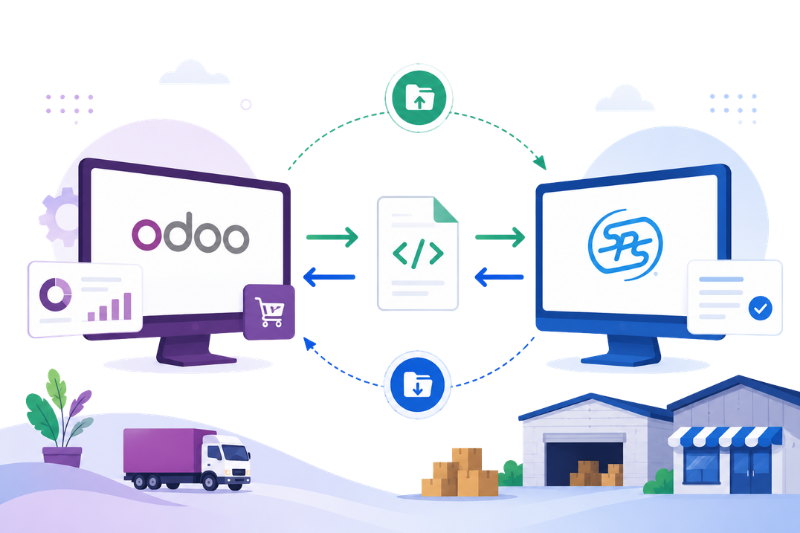
SPS Commerce Integration with Odoo Using XML and SFTP
Connect Odoo to your entire trading partner network - without managing complex EDI mappings inside your ERP.
Vraja Technologies builds SPS Commerce integrations for Odoo that use simple XML file exchange over SFTP. Whether you work with 10 trading partners or 50+, your Odoo instance stays clean, focused on business operations, while SPS Commerce handles all EDI translation and partner-specific communication.
How SPS Commerce Works with Odoo
This integration connects Odoo with SPS Commerce, one of the most widely used EDI middleware platforms in North America, through a structured XML file exchange over SFTP.
Odoo does not need to deal with raw EDI formats like ANSI X12, EDIFACT, RSX, or partner-specific mapping rules. Instead, Odoo exchanges clean, SPS-defined XML files with SPS Commerce via SFTP.
SPS Commerce then handles the conversion between those XML files and whatever EDI format each trading partner requires.
Supplier onboarding, EDI compliance, and partner-specific document mapping stay on the SPS Commerce side — where they belong.
Simple Integration Flow
Odoo Generates XML
Odoo creates clean SPS-defined XML files from ERP records.
Secure SFTP Exchange
Files are exchanged securely between Odoo and SPS Commerce.
SPS Converts XML to EDI
SPS converts XML into the required partner EDI format.
Trading Partner Delivery
SPS manages partner mapping, compliance, and delivery.
The File Exchange Flow - Inbound & Outbound
Odoo and SPS Commerce exchange structured XML files automatically through SFTP, keeping the complete EDI process smooth, secure, and easy to maintain.
Outbound: Odoo → Trading Partner
When a document is ready in Odoo — for example, a confirmed purchase order — the system automatically generates an XML file and uploads it to your SPS Commerce SFTP outbound folder. SPS Commerce picks up that file, converts it into the required EDI format, and delivers it to the correct trading partner.
Inbound: Trading Partner → Odoo
When a trading partner sends a document to SPS Commerce — such as a PO acknowledgement, shipment notice, or invoice — SPS Commerce converts it into SPS-defined XML format and places it in the SFTP inbound folder. Odoo then reads that file and automatically creates or updates the relevant record inside the ERP.
The result is a fully automated, bidirectional document exchange that runs without manual intervention on either side.
Why XML + SFTP Is the Right Architecture for Multi-Partner EDI
Most businesses struggle with EDI at scale because every trading partner has different requirements — different document formats, field mappings, and communication standards.
The SPS Commerce middleware approach solves this cleanly
Trying to manage every trading partner’s EDI rules directly inside Odoo creates complexity that is hard to maintain. With SPS Commerce, Odoo exchanges clean XML files through SFTP, while SPS handles partner-specific mapping, format conversion, supplier onboarding, and compliance.
Odoo Stays Simple
Your ERP team only needs to think about purchase orders, acknowledgements, shipments, and invoices — standard Odoo documents.
SPS Handles Complexity
Partner-specific EDI mapping, format conversion, supplier onboarding, and document transformation are all managed on the SPS side.
Scales to Any Number of Trading Partners
Adding a new supplier or retailer does not require changes inside Odoo. The new partner is configured once in SPS Commerce.
Easier to Maintain Long-Term
Because the EDI logic sits outside Odoo, your ERP customizations stay minimal, clean, and upgrade-friendly.
Supported Operations - What Gets Automated
The SPS Commerce and Odoo integration automates key purchasing, supplier communication, shipment, and vendor billing workflows through XML and SFTP.
Send Purchase Order from Odoo to SPS Commerce
When a purchase order is confirmed in Odoo, the integration automatically generates a PO XML file and uploads it to the SPS Commerce SFTP outbound folder. SPS Commerce converts it to the required EDI format and delivers it to the supplier.
- Supplier details
- Delivery address
- Order date
- Product lines
- Quantities
- Unit prices
- Requested delivery dates
Receive Purchase Order Response / Acknowledgement
Once a supplier receives and processes your purchase order, they send a response back through SPS Commerce. This acknowledgement confirms whether the order is accepted, rejected, partially accepted, or modified.
SPS Commerce converts that response into XML and places it in Odoo's inbound SFTP folder. Odoo imports the file and updates the purchase order — reflecting confirmed quantities, changed delivery dates, adjusted prices, or supplier notes.
- Accepted
- Accepted with Changes
- Quantity change
- Date change
- Price change
- Rejected
- Line-level status updates
Receive ASN - Advanced Shipping Notice
An ASN provides shipment details before goods physically arrive at the warehouse. Suppliers send shipment information to SPS Commerce, which converts it to XML and places it in the Odoo inbound folder.
Odoo imports the ASN and creates or updates the incoming shipment or receipt.
- Shipment and ASN number
- Carrier name
- Carrier code
- Service type
- Tracking number
- Per-package details
- Shipped quantities
- Expected delivery date
- Original purchase order reference
This allows your warehouse team to prepare receiving operations in advance — before the truck arrives.
Receive Vendor Bill / Invoice from SPS Commerce
After goods are shipped or delivered, the supplier sends an invoice through SPS Commerce. SPS Commerce converts the EDI invoice into XML and places it in the Odoo inbound folder.
Odoo imports the XML and creates a vendor bill matched against the related purchase order.
- Invoice number and date
- Product lines
- Invoiced quantities
- Unit prices
- Freight or shipping charges
- Tax amounts
- Payment terms
- Total invoice amount
This removes manual bill entry entirely and speeds up the purchase-to-pay cycle.
From purchase order export to acknowledgement, ASN, and vendor bill creation, the integration keeps the full supplier document flow automated inside Odoo.
Automation, Scheduling & Error Management Inside Odoo
The integration does not require manual file handling. Odoo uses scheduled actions to run the full document exchange automatically.
Outbound Automation
Purchase order XML files are generated and uploaded to SFTP automatically when a purchase order is confirmed in Odoo.
Inbound Automation
Odoo polls the SFTP inbound folder on a configured schedule — hourly, every few hours, or as needed. New XML files are imported and processed. Successfully processed files are moved to an archive folder, while failed files are moved to an error folder with a detailed log entry.
Transaction Logging
Every inbound and outbound file exchange is logged inside Odoo, giving your team full visibility into document movement, processing status, and issue tracking.
Transaction Log Details
Every file exchange is captured with clear operational details, helping your team track successful documents and quickly identify failed files.
This gives your operations team complete visibility into every document that has passed through the system — and a clear path to fix any issue quickly.
Why Work with Vraja Technologies for This Integration?
Vraja Technologies is a certified Odoo partner specializing in EDI integrations, multi-carrier shipping solutions, and Odoo ERP implementations for businesses across the USA, UK, and Europe.
We have built EDI automation inside Odoo using ANSI X12, EDIFACT, and XML standards — and we understand both the technical architecture and the real-world business requirements that come with multi-partner supply chains.
Custom XML Generation & Import Logic
XML generation and import logic tailored to your business documents and SPS Commerce workflow.
SFTP Connection Setup
Secure SFTP connection setup with inbound and outbound folder structure configuration.
Scheduled Action Setup
Automated scheduled actions for inbound and outbound XML processing inside Odoo.
Transaction Log Setup
Complete audit visibility for file history, processing status, XML data, and error tracking.
Post-Deployment Support & Error Handling Guidance
After go-live, we help your team monitor the integration, handle errors, improve workflows, and keep the SPS Commerce + Odoo connection stable.
Your Odoo system stays simple while SPS Commerce handles partner-specific EDI mapping, compliance, and document transformation.
How SPS Commerce Works with Odoo
This integration connects Odoo with SPS Commerce, one of the most widely used EDI middleware platforms in North America, through a structured XML file exchange over SFTP.
Here's the core idea: Odoo doesn't deal with raw EDI formats like ANSI X12, EDIFACT, RSX, or partner-specific mapping rules. Instead, Odoo exchanges clean, SPS-defined XML files with SPS Commerce via SFTP. SPS Commerce then handles the conversion between those XML files and whatever EDI format each trading partner requires.
Supplier onboarding, EDI compliance, and partner-specific document mapping all stay on the SPS Commerce side — where they belong.
Odoo Generates XML
Odoo creates SPS-defined XML files for supported business documents.
Exchange via SFTP
Files are securely exchanged between Odoo and SPS Commerce.
SPS Converts XML to EDI
SPS converts XML into the required trading partner EDI format.
Partner Delivery
SPS manages supplier-specific compliance, mapping, and document delivery.
The File Exchange Flow - Inbound & Outbound
The integration works in both directions, allowing Odoo and trading partners to exchange documents automatically through SPS Commerce.
Outbound: Odoo → Trading Partner
When a document is ready in Odoo — for example, a confirmed purchase order — the system automatically generates an XML file and uploads it to your SPS Commerce SFTP outbound folder. SPS Commerce picks up that file, converts it into the required EDI format, and delivers it to the correct trading partner.
Inbound: Trading Partner → Odoo
When a trading partner sends a document to SPS Commerce — such as a PO acknowledgement, shipment notice, or invoice — SPS Commerce converts it into SPS-defined XML format and places it in the SFTP inbound folder. Odoo then reads that file and automatically creates or updates the relevant record inside the ERP.
The result is a fully automated, bidirectional document exchange that runs without manual intervention on either side.
Why XML + SFTP Is the Right Architecture for Multi-Partner EDI
Most businesses struggle with EDI at scale because every trading partner has different requirements — different document formats, different field mappings, and different communication standards. Trying to manage all of that inside Odoo creates complexity that's hard to maintain.
Odoo Stays Simple
Your ERP team only needs to think about purchase orders, acknowledgements, shipments, and invoices — standard Odoo documents.
SPS Handles Complexity
Partner-specific EDI mapping, format conversion, supplier onboarding, and document transformation are managed on the SPS side.
Scales to Any Partner
Adding a new supplier or retailer doesn't require changes inside Odoo. The new partner is configured once in SPS Commerce.
Easy to Maintain
Because the EDI logic sits outside Odoo, your ERP customizations stay minimal, clean, and upgrade-friendly.
Supported Operations - What Gets Automated
The SPS Commerce and Odoo integration automates the key purchasing and supplier document exchange process.
Send Purchase Order from Odoo to SPS Commerce
When a purchase order is confirmed in Odoo, the integration automatically generates a PO XML file and uploads it to the SPS Commerce SFTP outbound folder. SPS Commerce converts it to the required EDI format and delivers it to the supplier.
The XML includes all standard purchase order data: supplier details, delivery address, order date, product lines, quantities, unit prices, and requested delivery dates.
Receive Purchase Order Response / Acknowledgement
Once a supplier receives and processes your purchase order, they send a response back through SPS Commerce. This acknowledgement confirms whether the order is accepted, rejected, partially accepted, or modified.
SPS Commerce converts that response into XML and places it in Odoo's inbound SFTP folder. Odoo imports the file and updates the purchase order — reflecting confirmed quantities, changed delivery dates, adjusted prices, or supplier notes.
- Accepted
- Accepted with Changes
- Rejected
- Line-level status updates
Receive ASN - Advanced Shipping Notice
An ASN provides shipment details before goods physically arrive at the warehouse. Suppliers send shipment information to SPS Commerce, which converts it to XML and places it in the Odoo inbound folder.
Odoo imports the ASN and creates or updates the incoming shipment or receipt.
- Shipment and ASN number
- Carrier name, code, and service type
- Tracking number
- Per-package details and shipped quantities
- Expected delivery date
- Original purchase order reference
This allows your warehouse team to prepare receiving operations in advance — before the truck arrives.
Receive Vendor Bill / Invoice from SPS Commerce
After goods are shipped or delivered, the supplier sends an invoice through SPS Commerce. SPS Commerce converts the EDI invoice into XML and places it in the Odoo inbound folder.
Odoo imports the XML and creates a vendor bill matched against the related purchase order.
- Invoice number and date
- Product lines with invoiced quantities and unit prices
- Freight or shipping charges
- Tax amounts and payment terms
- Total invoice amount
This removes manual bill entry entirely and speeds up the purchase-to-pay cycle.
Automation, Scheduling & Error Management Inside Odoo
The integration doesn't require manual file handling. Odoo uses scheduled actions to run the full document exchange automatically.
Outbound Automation
Purchase order XML files are generated and uploaded to SFTP automatically when a PO is confirmed.
Inbound Automation
Odoo polls the SFTP inbound folder on a configured schedule — hourly, every few hours, or as needed. New XML files are imported and processed. Successfully processed files are moved to an archive folder. Failed files are moved to an error folder with a detailed log entry.
Transaction Logging
Every inbound and outbound file exchange is logged inside Odoo, giving your operations team complete visibility and a clear path to fix any issues quickly.
Transaction Log Details
Every file exchange — inbound and outbound — is logged inside Odoo with the following details:
Build Your SPS Commerce + Odoo Integration with EDI Experts
Vraja Technologies is a certified Odoo partner specializing in EDI integrations, multi-carrier shipping solutions, and Odoo ERP implementations for businesses across the USA, UK, and Europe.
We've built EDI automation inside Odoo using ANSI X12, EDIFACT, and XML standards — and we understand both the technical architecture and the real-world business requirements that come with multi-partner supply chains.
Custom XML Logic
XML generation and import logic tailored to your SPS Commerce document flow.
SFTP Setup
Secure folder structure, inbound/outbound configuration, and connection setup.
Scheduled Automation
Automated import/export jobs for purchase orders, ASN, acknowledgements, and bills.
Audit Visibility
Transaction logs, XML history, processing status, and error traceability inside Odoo.
Post Deployment Support
We help your team after go-live with monitoring, issue handling, workflow improvements, and long-term integration support.

