





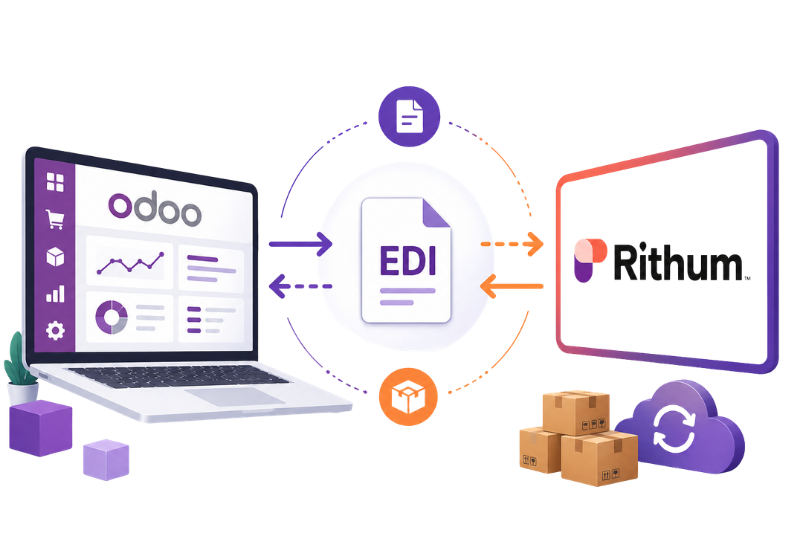
CommerceHub / Rithum EDI Integration with Odoo
Automate your entire order-to-cash process - from purchase order to invoice - directly inside Odoo using SFTP-based EDI with CommerceHub / Rithum.
Suppliers, vendors, and distributors working with Costco, Walmart, RONA, Staples, and other major retail chains can eliminate manual EDI processing with a purpose-built Odoo integration that handles every document exchange automatically.
What Is CommerceHub / Rithum - and Why Does It Matter for Odoo Users?
CommerceHub, now unified under the Rithum brand, is one of the most widely used EDI and commerce networks connecting suppliers with large retail trading partners. Retailers like Costco, Walmart, RONA, and Staples use this network to exchange business documents electronically - from purchase orders and shipment notices to invoices and inventory updates.
If your business runs on Odoo ERP, integrating with CommerceHub / Rithum through SFTP and standard EDI document flows means your team no longer needs to manually download files, key in orders, or prepare invoices by hand.
receiving orders, processing them, and sending back the required documents automatically.
How the Integration Helps
Retailers Send EDI Orders
Trading partners send purchase orders through CommerceHub / Rithum.
Odoo Receives Orders
Orders are imported into Odoo automatically without manual entry.
Team Processes in Odoo
Sales, inventory, delivery, and invoicing stay managed inside Odoo ERP.
Documents Sent Back
Shipment notices, invoices, and inventory updates are sent back automatically.
How the CommerceHub / Rithum + Odoo Integration Works
The integration connects Odoo directly to CommerceHub / Rithum via SFTP - the standard file transfer protocol used in retail EDI networks.
Trading Partner Sends EDI Document
Costco, Walmart, RONA, or another retailer sends an EDI file, for example, an 850 Purchase Order, to CommerceHub / Rithum.
CommerceHub / Rithum Hosts the File
The document is made available on the SFTP server.
Odoo Connects and Imports
Odoo automatically fetches the file from the SFTP server on a scheduled basis.
Odoo Processes the Document
The EDI data is validated and converted into the appropriate Odoo record - a Sales Order, for example.
Odoo Generates a Response
Odoo creates the outbound EDI document, such as an order acknowledgement, ASN, invoice, or inventory update.
File Uploaded Back via SFTP
Odoo pushes the response file back to CommerceHub / Rithum through the configured SFTP connection.
Trading Partner Receives the Document
CommerceHub / Rithum routes the file to the correct retail partner automatically.
No Manual Intervention
Odoo and your retail trading partners stay synchronized automatically through the full EDI document cycle.
This closed-loop automation keeps your Odoo ERP in sync with CommerceHub / Rithum and your retail trading partners - without manual intervention at any step.
Supported EDI Documents in Odoo
Our Odoo EDI integration with CommerceHub / Rithum supports all major X12 EDI document types used in retail commerce. Each document maps directly to a corresponding action inside Odoo.
Purchase Order (Inbound)
When a trading partner places an order, the 850 Purchase Order is sent through CommerceHub / Rithum into Odoo, where it is automatically converted into a Sales Order.
Creates a Sales Order with customer details, delivery address, product lines, quantities, prices, and requested delivery dates.
Costco sends a purchase order for 100 units. Odoo imports the 850 file and creates the Sales Order automatically - no manual data entry needed.
Purchase Order Change (Inbound)
When a trading partner needs to modify an existing order - changing quantities, pricing, dates, or cancelling a line - the 860 document is sent to Odoo.
Locates the original Sales Order and updates the relevant order lines according to the change instructions.
Walmart sends an 860 to reduce a line item from 100 to 80 units. Odoo finds and updates the Sales Order automatically.
Purchase Order Acknowledgement (Outbound)
Once Odoo receives and reviews a purchase order, it sends back an 855 to confirm whether the order is accepted, partially accepted, or rejected.
Generates the acknowledgement directly from the Sales Order, including accepted quantities and any changes.
RONA sends a purchase order. After reviewing stock availability in Odoo, an 855 acknowledgement is sent back confirming the order is accepted in full.
Advance Ship Notice / ASN (Outbound)
Before goods arrive at the retailer's warehouse, an 856 ASN is sent to provide full shipment details - carrier, tracking number, package contents, and shipped quantities.
Generates the ASN from a confirmed Delivery Order / Stock Picking in Odoo, including all required shipment details.
After completing a delivery order in Odoo, the 856 ASN is automatically generated and sent - giving the trading partner advance visibility before the goods arrive.
Invoice (Outbound)
After goods are shipped, Odoo generates and sends an 810 Invoice through CommerceHub / Rithum for payment processing by the trading partner.
Creates the EDI invoice file from a posted Customer Invoice in Odoo, including PO reference, product details, quantities, pricing, taxes, freight, and totals.
After a Walmart shipment is confirmed, Odoo posts the invoice and automatically sends the 810 EDI file to CommerceHub / Rithum.
Inventory Advice (Outbound)
Retail partners need to know how much inventory is available before they can place or plan orders. The 846 Inventory Advice lets Odoo share real-time or scheduled stock availability directly with trading partners.
Pulls current available stock levels from Odoo's inventory and generates an 846 file per SKU for each connected trading partner.
Odoo runs a daily stock check and automatically sends an 846 with available quantities for all active SKUs - helping retailers plan their replenishment orders.
Product Catalog / Price Catalog (Outbound)
When product details or pricing are updated, Odoo can send an 832 Product Catalog to trading partners, keeping their systems in sync with your latest data.
Generates the 832 from Odoo product master records, including SKU, UPC, description, price, unit of measure, and other product attributes.
A supplier updates pricing across 50 products in Odoo. An 832 Product Catalog file is automatically sent to all connected trading partners through CommerceHub / Rithum.
From inbound purchase orders to outbound acknowledgements, ASNs, invoices, inventory updates, and product catalogs, Odoo can manage the full CommerceHub / Rithum EDI document cycle automatically.
Complete Odoo EDI Workflow with CommerceHub / Rithum
Order Processing Flow
Inventory and Product Catalog Flow
Odoo manages your product and stock data centrally. Based on your schedule or trigger conditions, Odoo sends:
Key Features of Our Odoo CommerceHub / Rithum Integration
One automation flow for orders, shipping, invoices, stock, and catalog updates.
This integration keeps CommerceHub / Rithum and Odoo connected through automated file exchange, document mapping, partner rules, and complete EDI visibility.
Automated SFTP File Exchange
Odoo connects directly to the CommerceHub / Rithum SFTP server to download inbound files and upload outbound EDI documents automatically - no manual file handling required.
Sales Order Automation from 850
Incoming 850 Purchase Orders are automatically mapped to Odoo Sales Orders, including all customer, product, pricing, and delivery data.
Purchase Order Change Handling
860 documents update existing Odoo Sales Orders in real time — no need to locate and edit orders manually when trading partners request changes.
Order Acknowledgement 855
Odoo generates and sends 855 acknowledgements after reviewing each purchase order, confirming accepted, changed, or rejected quantities back to the trading partner.
ASN Generation from Delivery Orders
Once a delivery is confirmed in Odoo, an 856 ASN is generated with carrier, tracking number, package details, and shipped quantities - and sent automatically.
Invoice EDI Automation
Posted Odoo customer invoices are automatically converted into 810 EDI Invoice files and uploaded to CommerceHub / Rithum for trading partner payment processing.
Real-Time Inventory Updates
Odoo generates 846 Inventory Advice documents from live or scheduled stock data, keeping all connected trading partners updated on availability.
Product and Price Catalog Sync
Changes to product master data or pricing in Odoo can trigger automatic generation of 832 Product Catalog files for distribution to trading partners.
Trading Partner-Specific Configuration
Each trading partner - Costco, Walmart, RONA, Staples, and others - can have separate mapping rules, required fields, document settings, and validation logic within the same Odoo integration.
EDI Logs and Error Tracking
Every inbound and outbound EDI document is logged in Odoo with status, file name, processing date, and error details - giving your team full visibility and easy troubleshooting.
Why Automate EDI with Odoo and CommerceHub / Rithum?
Less manual work. Faster fulfillment. Better EDI control inside Odoo.
Automating EDI removes repetitive file handling and keeps orders, shipments, invoices, inventory, and catalog updates flowing through Odoo.
Eliminate Manual Data Entry
Orders, shipments, invoices, inventory updates, and catalog changes are processed automatically - freeing your operations team from repetitive, error-prone work.
Reduce Errors and Improve Accuracy
Automated EDI mapping removes the risk of manual mistakes in order quantities, pricing, product identifiers, and shipment details.
Fulfill Orders Faster
Purchase orders land directly in Odoo the moment they are available on CommerceHub / Rithum - accelerating sales order creation, picking, packing, and shipment.
Stay Compliant with Trading Partner Requirements
Different retailers have different EDI specifications. Our integration is configured to meet each partner's exact requirements for document structure, mandatory fields, and validation rules.
Full Visibility in Odoo
Track every order, shipment, invoice, and EDI document status directly from your Odoo dashboard - no need to log into CommerceHub / Rithum for status checks.
Scale Across Multiple Trading Partners
The same integration framework supports all your trading partners - with partner-specific configurations handling the differences while sharing the common EDI infrastructure.
Why Work with Vraja Technologies for CommerceHub / Rithum EDI Integration?
Vraja Technologies is an Odoo-certified partner with hands-on experience building EDI integrations for suppliers and distributors working with large retail trading partners.
We implement CommerceHub / Rithum EDI connections using SFTP and standard X12 document flows - customized to match your specific trading partner requirements.
Our team can support:
- SFTP setup and configuration
- EDI mapping for 850, 860, 855, 856, 810, 846, and 832
- Sales Order automation
- Purchase order change handling
- ASN generation from deliveries
- Invoice EDI automation
- Inventory update scheduling
- Product and price catalog automation
- Partner-specific customization
- Error handling and retry logic
- EDI log management
- Testing, certification, and production deployment

