

Amount-based
Workers get a fixed budget for approved workwear
- Workers receive
- A monetary budget
- Company controls
- Purchasing value
Odoo construction employee allowance management lets a contractor or engineering firm give each site worker, engineer and technician a workwear budget, a quantity entitlement or a points balance, limit it to approved safety boots, helmets, protective jackets and workwear, and track every purchase in one system. Workers order through an Odoo-powered portal, and administrators see allowance usage, remaining balances and purchasing records. If you have very few employees and only occasional workwear purchases, you do not need a system for this.
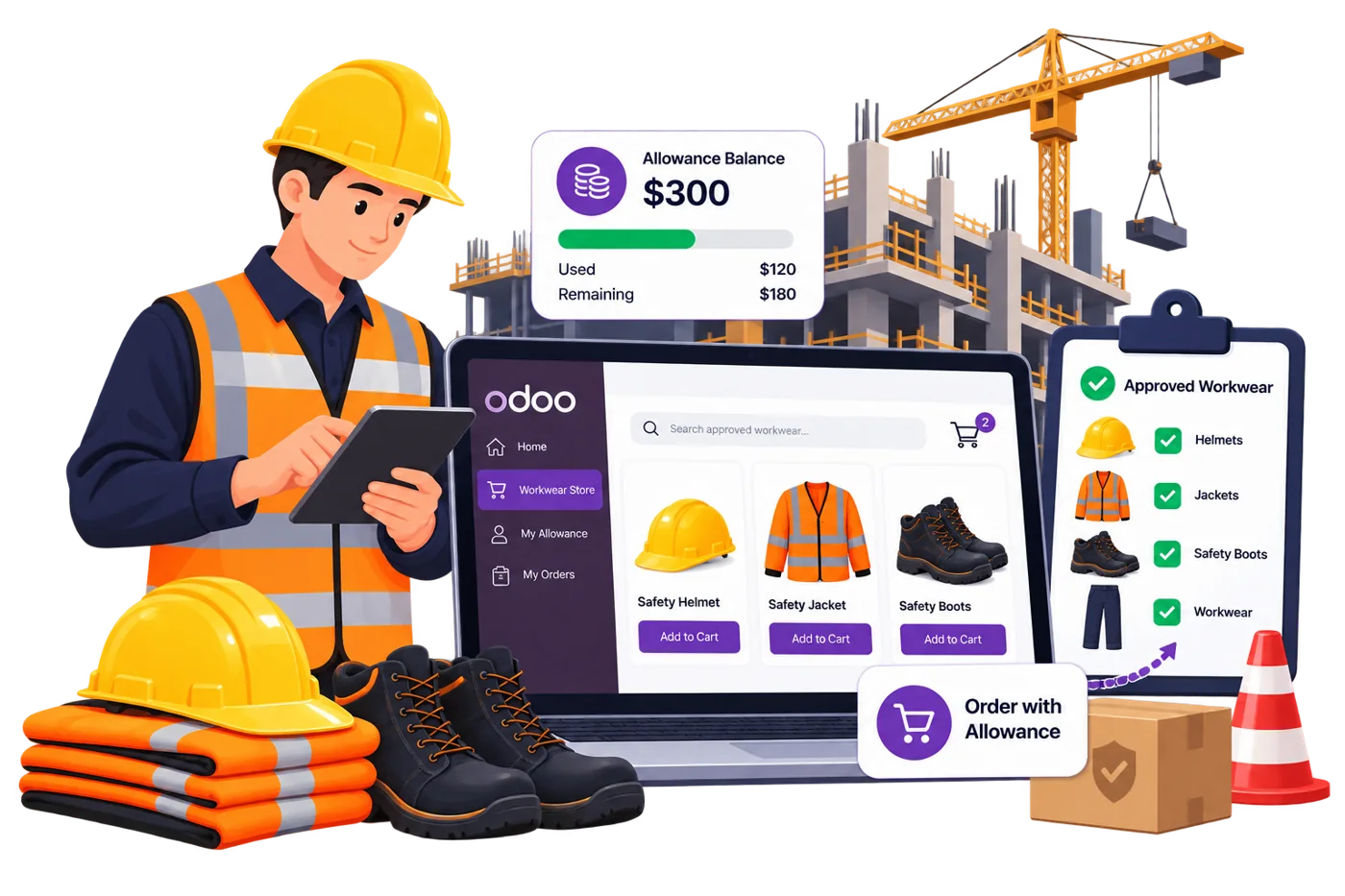
This page is for construction and engineering companies with different roles, several sites and company-funded purchasing, and for workwear suppliers who run those programs for construction customers. Vraja Technologies, a Certified Odoo Partner, configures the solution around your workforce, approved products and purchasing requirements. For the general solution behind it, see our Odoo employee allowance management page.
Choose amount-based for a workwear budget, unit-based for fixed quantities of specific items, and points-based for a shared balance across approved products.
Workers get a fixed budget for approved workwear
Workers get defined quantities of specific products
Workers choose from approved products using a points balance
The available models depend on the configured implementation.
Construction and engineering companies have people working across different projects, sites and roles. A site engineer needs approved protective clothing, a construction worker needs safety footwear and high-visibility workwear, and a maintenance technician needs something different again. Spreadsheets and manual records get harder to keep right as the workforce grows.
Site workers, engineers, supervisors and maintenance teams need different approved products
Assigning budgets or product entitlements one by one adds administrative work
Workers can select products outside their approved categories
Administrators struggle to see used and remaining workwear allowances
Companies must run purchasing programs for people working in different locations
Workers may need extra approved products before the next scheduled renewal
Cancelled or returned orders need matching allowance corrections
Three things set a construction program apart from a generic workwear program:
The allowance is tied to the employee record, while site-based eligibility or reporting needs are assessed during implementation.
A torn jacket in month five should not wait for next year's renewal, so extra requests and replacement rules matter.
The approved-product list should follow your own safety requirements, with the allowance system enforcing it at checkout.
Each role gets its own approved products and its own limit, set up once and applied at checkout.
Yes. Allowance policies can be configured for employee groups, departments or job responsibilities when advanced eligibility functionality is included, so each role can be defined by the products its people are authorized to receive.
These are illustrative categories. Actual product eligibility should follow the employer's safety requirements and allowance policy.
You define which products or categories qualify for a worker's allowance. For example, a construction business can assign an approved workwear allowance to site workers, who spend it on eligible products while non-approved products stay outside the company-funded benefit. Different eligibility policies can be set for different employee groups.
Workers access the Odoo purchasing website with their assigned accounts, review their allowance, browse approved products, add items to the cart and apply their allowance at checkout. For optional products where co-payment is permitted, any amount the allowance does not cover is paid through the configured payment process.
Authorized administrators review allocations, purchasing activity, used credit and remaining balances through the configured company dashboard. The credit transaction ledger records allocations, deductions, restorations, expiry and adjustments.
For example, an administrator can see how much of a worker's annual workwear allowance has been used and open the related purchases. Reporting filters by employee, company, date range or allowance period can be provided where supported.
Match the model to what you want to control: purchasing value, product quantities, or a flexible entitlement.
It gives workers a defined monetary budget for qualifying purchases during a set period. It suits employer-funded programs where eligible products have different prices.
The worker can use the remaining $120 toward qualifying purchases during the allowance period.
Example: a construction company gives an eligible worker a $300 annual allowance for approved workwear.
It defines how many approved products a worker can buy in a period, without relying only on monetary budgets.
Example: an annual construction workwear entitlement.
It gives workers a number of points to spend on eligible products at configured point values, so people can pick from several products using one common balance.
Example: a construction company gives a worker 30 points for approved workwear and accessories. The worker buys qualifying products worth 12 points, and 18 points remain.
Unit-based and points-based allowances are advanced capabilities and depend on the selected Odoo implementation.
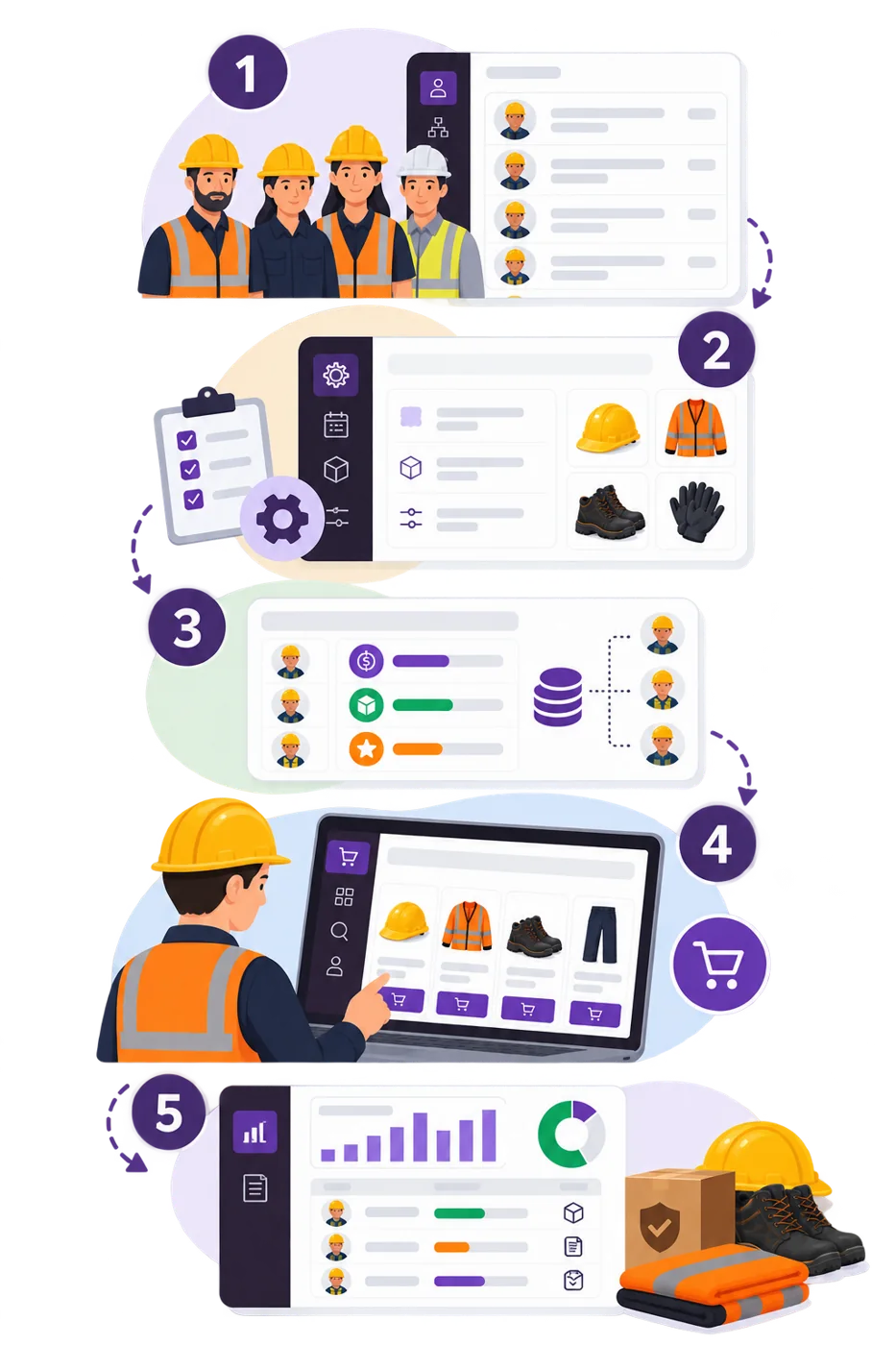
A construction program runs in five steps, connecting employee records, purchasing policies, approved products, online ordering and allowance tracking.
Create or import employee records and associate workers with the relevant company. Maintain job roles, departments and other eligibility information where required.
Define the allowance model, purchasing limits, approved products and validity periods. Additional eligibility rules can cover different worker groups.
Assign monetary credit, unit entitlements or points to eligible workers, manually, through structured spreadsheet imports or through configured scheduled rules.
Workers log in to the Odoo website, select eligible products and place orders. The system evaluates the purchasing rules and decides how the allowance applies.
Purchasing and credit transactions are recorded in Odoo, and authorized administrators review allowances, usage, remaining balances and orders.
An annual renewal, a worn-out jacket and a wrong-size return are the situations a construction program plans for. Each follows your policy, and the full set of options is on our employee allowance management page.
a contractor renews workwear allowances at the start of each calendar year. Anniversary-based renewal is available when the advanced functionality is configured. Unused credit can expire or carry forward up to a configured cap, depending on the allowance model and policy features.
a contractor sets an annual ordering period for standard workwear, and allowance use outside it is restricted.
where an exception workflow is enabled, a worker who needs an additional protective jacket before the next renewal can request extra credit or quantities, and an administrator approves or rejects the request.
alerts can be configured for new allocations, upcoming expiry and periodic usage summaries.
when a qualifying purchase is returned or cancelled, the configured refund workflow restores the applicable allowance.
The solution can be configured around prepaid funding or periodic consolidated billing.
the construction company funds an agreed allowance amount in advance. Eligible purchases use the allowance, and the credit transactions are recorded through the configured financial workflow.
a workwear supplier serves employees of one or more construction companies. Eligible company-funded purchases build up over a billing period and go into one consolidated invoice, with employee-paid amounts recorded separately.
Accounting entries, invoice timing, tax treatment and reconciliation must match your accounting requirements.
The most common fits are site worker programs, quantity-based entitlements, trade-specific policies, new-worker onboarding, multi-site purchasing, and departing workers.
A construction company gives site workers purchasing allowances for approved workwear and protective clothing. Workers order through the portal, and administrators monitor activity and remaining allowances.
A contractor gives workers fixed annual quantities of approved jackets, trousers and high-visibility clothing. When unit-based functionality is included, the system tracks purchased quantities against each worker's entitlement.
A construction and engineering business employs civil engineers, technicians, supervisors and site workers, each needing different approved product categories. Configured eligibility rules apply the relevant policy.
A new worker gets an initial allowance and orders approved products after registration. When a contractor onboards a large crew, structured spreadsheet imports load employee and allowance data, and scheduled allocation rules can be configured where supported.
A contractor with employees at several locations configures the framework around its employee records and organizational structure. Site-based eligibility or reporting requirements are evaluated as part of the implementation.
When a worker becomes inactive or leaves, the implemented lifecycle rules control future allowance activity while keeping the historical records.
An implementation follows six steps, and the effort depends mainly on the number of sites, roles and allowance models.
Confirm roles, approved products against your safety requirements, allowance model, billing arrangement and reporting needs.
Set up the relevant apps, including the website, Sales and Invoicing.
Build the role, trade and product rules your policy needs.
Import employee records and allocations using the agreed fields and validation rules.
Run orders, split payments, returns and invoicing before deployment.
Deploy, then check reports and balances against your first allocation cycle.
Things that make a project larger: several sites with separate eligibility or reporting, many roles with different product lists, unit-based or points-based models, and consolidated billing for a supplier. A scoping call gives you a timeline and estimate for your setup.
Skip it if you have very few employees, only occasional workwear purchases and no recurring entitlement needs. A spreadsheet is enough at that size.
The solution suits companies that regularly allocate purchasing benefits, manage different employee groups and need central records of approved purchases and allowance usage.
It is not a replacement for safety assessments, PPE compliance management, physical equipment issuance or construction inventory control.
Confirm the exact allowance models, renewal rules and advanced workflows during implementation planning.
Vraja Technologies is a Certified Odoo Partner that configures and customizes Odoo solutions around operational requirements. Construction and engineering companies differ in workforce structure, approved products, purchasing policy and billing arrangements, so the work starts with your requirements. For this solution we can help with:
Yes. Odoo can be configured to allocate allowances for approved workwear, safety footwear, protective clothing and other job-related products.
Yes. Advanced eligibility rules can support different policies for site workers, engineers, maintenance teams and other employee groups.
Yes. Workers use the configured Odoo purchasing website to browse eligible products, view relevant allowance information and place orders.
Yes. When unit-based functionality is included, you can define product quantity entitlements for approved workwear items.
Yes. Validity and calendar-based renewal rules can be configured. Anniversary renewal and advanced carry-forward options depend on the implementation.
Where exception workflows are enabled, workers can request additional credit or product quantities for review by authorized administrators.
Yes, for qualifying returns and cancellations, under the configured refund rules. Partial restorations can also be supported.
Yes. Product or category eligibility rules determine which products qualify for company-funded purchasing.
Yes. Structured spreadsheet imports can allocate purchasing benefits to large employee groups.
The framework supports company-specific purchasing programs. Site-specific eligibility, reporting and access requirements are assessed during implementation.
Yes. A configured postpaid workflow can accumulate eligible company-funded purchases and support consolidated company billing.
Yes. We customize purchasing policies, employee eligibility, allowance models, checkout, reporting and Odoo workflows to the contractor's requirements.
No questions match your search.