






Inter-Warehouse Transfer in Odoo
Workflow Overview
The Inter-Warehouse Transfer workflow in Odoo allows businesses to move products from one warehouse to another while maintaining accurate inventory quantities at each location.
This workflow is useful when one warehouse has sufficient stock while another warehouse needs additional inventory to fulfill sales orders or maintain its required stock level.
For example, a company operates both an Ahmedabad Warehouse and a YourCompany Warehouse. If a customer places an order from the YourCompany Warehouse and the required product is unavailable there, Odoo can use a configured warehouse route to replenish the required quantity from the Ahmedabad Warehouse.
Configuration Required
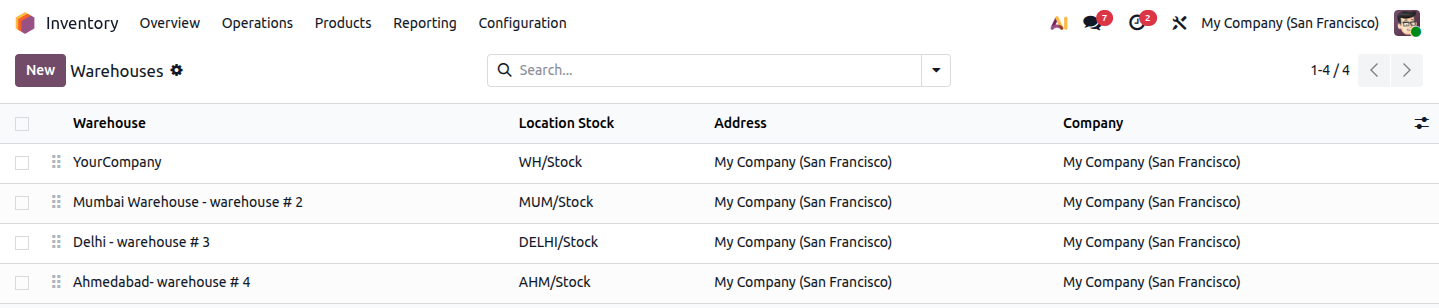 Image :- - warehouse-list.png
YourCompany (WH/Stock), Mumbai Warehouse – warehouse #2 (MUM/Stock), Delhi – warehouse #3 (DELHI/Stock), and Ahmedabad – warehouse #4 (AHM/Stock), each tied to its own stock location under My Company (San Francisco).
open the warehouse which you want to configure.
1. Configure the "Resupply From" Route on the Warehouse
This automatically creates a dedicated route, for example:
This route defines a pull rule that moves stock from the source warehouse's Stock location to an Inter-Warehouse Transit location, and then to the destination warehouse's Stock location.
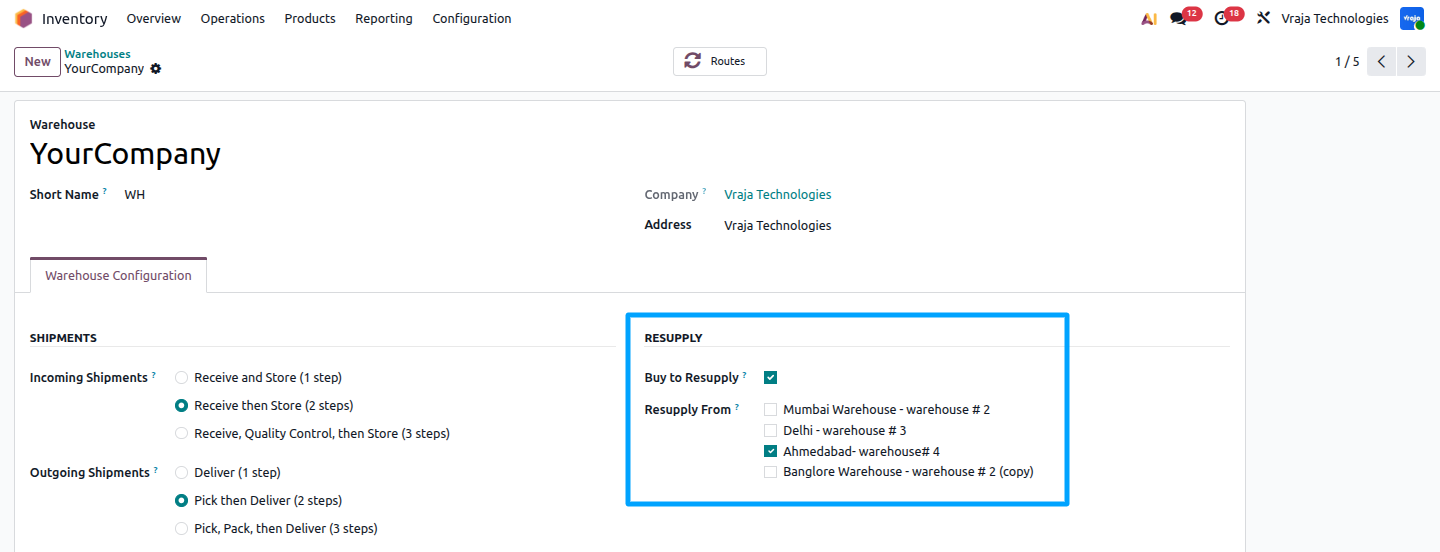 Image :- resupply_2.png
2. Choose the Transfer Steps (1-Step, 2-Step, or 3-Step)
Just like a warehouse's own incoming and outgoing shipments, a resupply route between two warehouses can be configured as a 1-Step, 2-Step, or 3-Step transfer. The right option depends on how much control is needed over picking, packing, and receiving as stock moves from the source warehouse to the destination warehouse.
1-Step Transfer (Direct)
Stock moves straight from the source warehouse's Stock location to the destination warehouse's Stock location, in a single internal transfer.
No intermediate handling — fastest option.
Best when the two warehouses are close by, or the transfer doesn't need extra checks.
2-Step Transfer (Output → Stock)
An Output/staging location is added at the source warehouse before the transfer leaves.
Useful when the sending warehouse needs a packing or staging step before goods are dispatched.
3-Step Transfer (Output → Input → Stock)
Handling is added on both ends of the transfer.
Adds a packing step at the source and a receiving/quality-check step at the destination before stock is put away.
Gives the most control — useful when incoming stock from another warehouse must be inspected or verified before it becomes available to sell.
In short: more steps = more checkpoints (packing, staging, inspection) between the two warehouses, at the cost of extra transfers and time. Fewer steps = faster movement but less control.
3. Enable the Route on the Product
Open the product record and go to the Inventory tab.
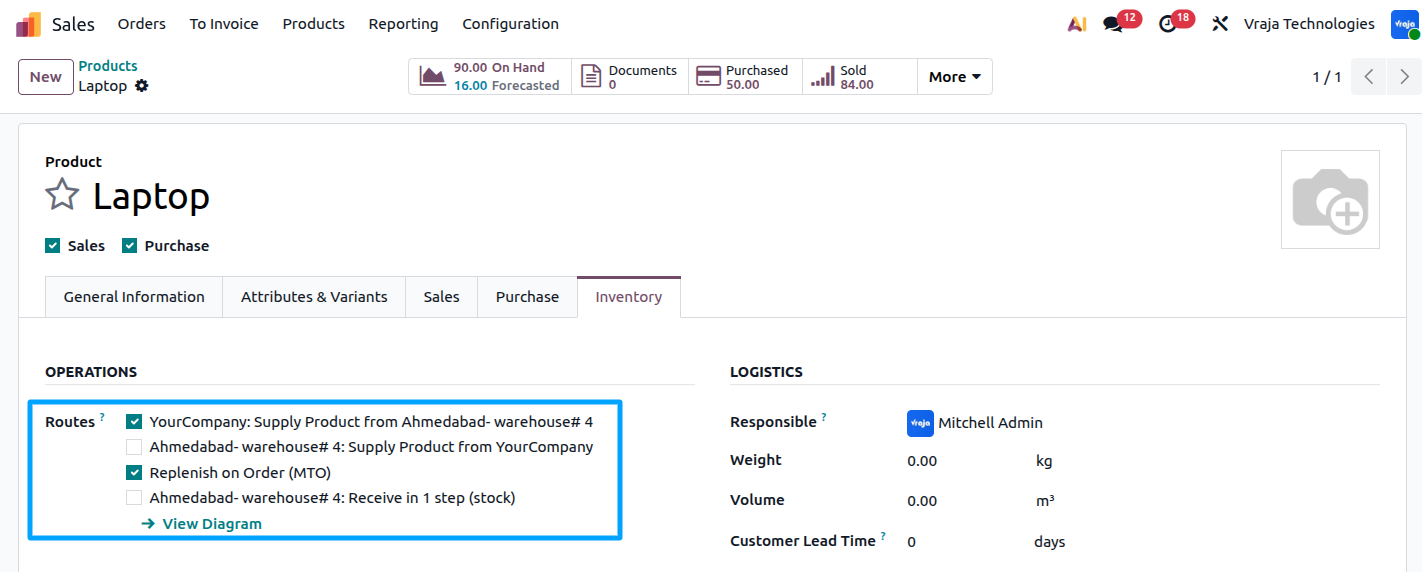 Image :- product_3.png
-> Complete Transaction Workflow
Step 1: Customer Places a Order
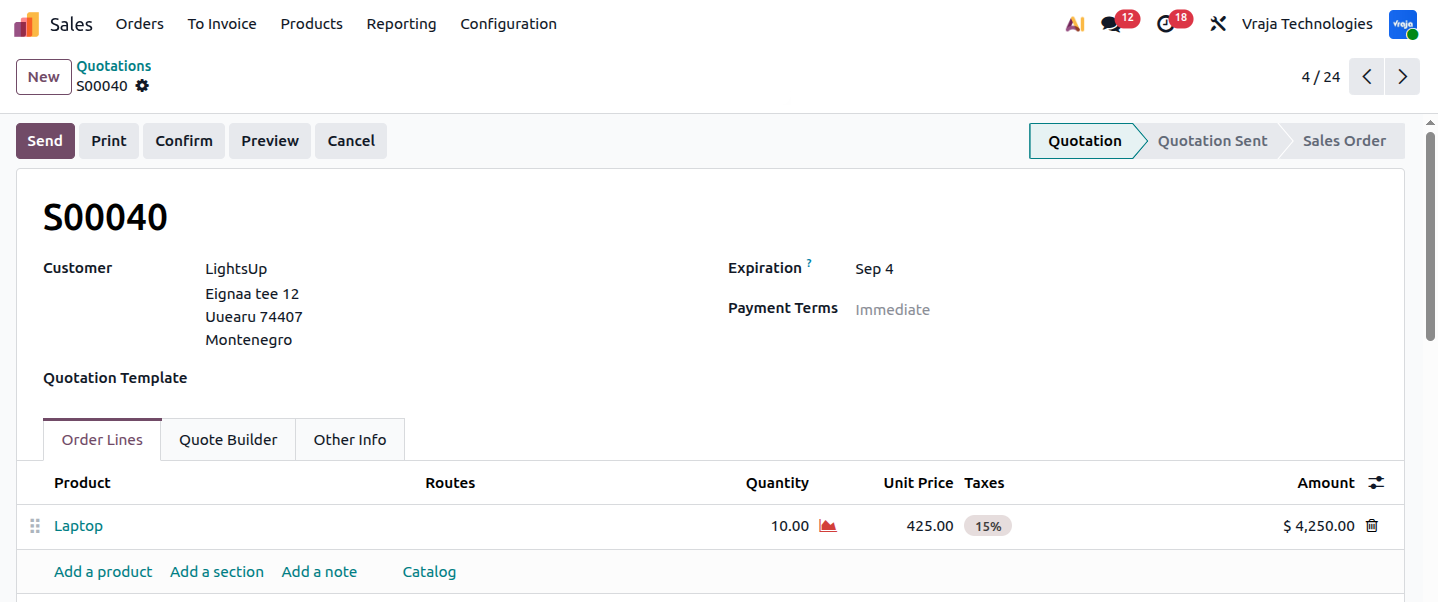 Image :- sale_order_4.png
Step 2: Odoo Checks Warehouse Availability
When the Sales Order is confirmed, Odoo checks the available stock in the selected YourCompany Warehouse. If the required quantity is available, Odoo can reserve the products and proceed with the Delivery Order.
If the YourCompany Warehouse does not have sufficient stock, the configured inter-warehouse route can trigger a transfer from the Ahmedabad Warehouse.
For example, suppose a customer places an order for 10 units from the YourCompany Warehouse, but only 4 units are available. If the route is configured to replenish YourCompany Warehouse from the Ahmedabad Warehouse, Odoo can create an internal transfer to move the required stock between the two warehouses.
The stock movement follows the configured warehouse route:
This allows the business to fulfill customer orders by moving products from the Ahmedabad Warehouse to the YourCompany Warehouse, instead of manually creating separate transfer operations.
If the warehouses use an intermediate transit location, the movement can follow:
This ensures that the YourCompany Warehouse receives the required stock before the products are delivered to the customer.
Pull Rule Concept :-
How the Pull Rule Triggers the Inter-Warehouse Transfer
The inter-warehouse replenishment route uses a Pull Rule to determine when products need to be moved from the supplying warehouse to the destination warehouse.
A Pull Rule is triggered when there is a demand for products at a specific destination location. In this example, the customer order creates demand for products in the YourCompany Warehouse. If the required quantity is not available in WH/Stock, Odoo follows the configured replenishment route to obtain the required products from the Ahmedabad Warehouse.
The configured Pull Rule essentially tells Odoo:
When products are required in YourCompany Warehouse, pull them from Ahmedabad Warehouse.
The Pull Rule does not mean that products are immediately moved when the rule is configured. Instead, it creates the required stock movement in response to demand. Odoo generates the appropriate transfer operations according to the configured warehouse route.
Therefore, when the Sales Order creates a requirement for stock in WH/Stock, Odoo uses the Pull Rule to initiate the configured inter-warehouse replenishment process.
The resulting transfer chain is then handled through the steps described in the following section.
Step 3: Odoo Creates the Internal Transfer Chain
If the selected warehouse does not have sufficient stock, Odoo automatically creates an inter-warehouse transfer and follows the configured transfer process below.
Odoo automatically creates the necessary linked transfers to move stock from the supplying warehouse to the destination warehouse:
These documents are linked together through the procurement chain, and the Sales Order shows smart buttons to navigate through all related transfers.
Step 4: Validate the Outbound Transfer from the Supplying Warehouse
This moves the products from the Ahmedabad Warehouse Stock location to the Inter-Warehouse Transit location, making the products available for receipt into the YourCompany Warehouse.
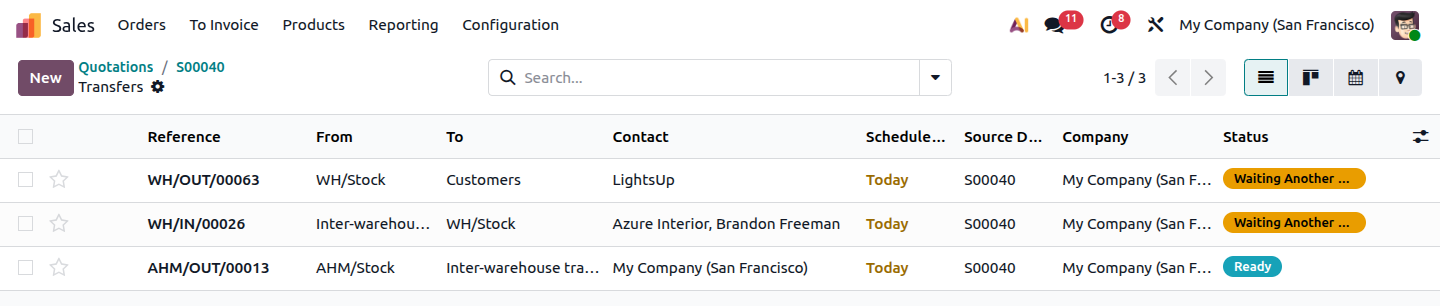 Image :- AHM-W_5.png
Step 5: Receive the Products into the Destination Warehouse
This moves the products from the Inter-Warehouse Transit location into the YourCompany Warehouse Stock location. Once validated, the transferred products become available in the YourCompany Warehouse for the customer delivery.
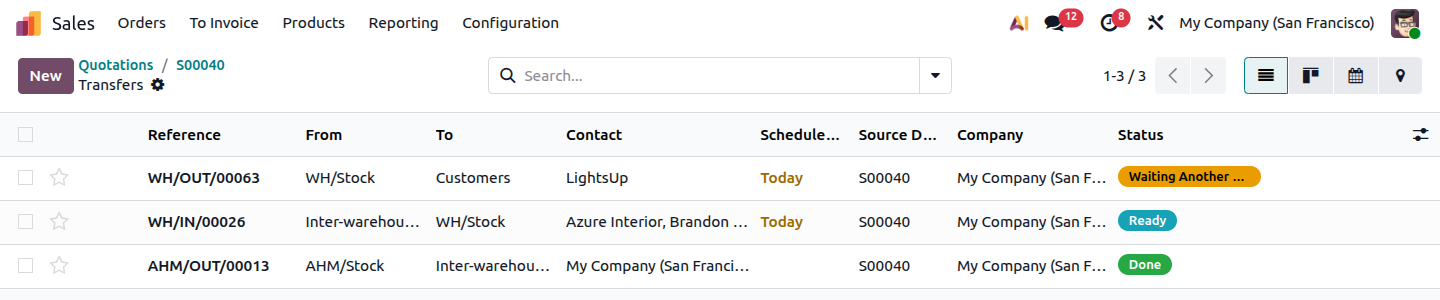 Image :- inter-transfer_6.png
Step 6: Deliver the Products to the Customer
This completes the stock movement from the YourCompany Warehouse Stock location to the Customer location. The warehouse team does not need to manually search for the sales order or create a new delivery operation. Once the required stock is received, Odoo links it to the original customer delivery and allows the order to proceed.
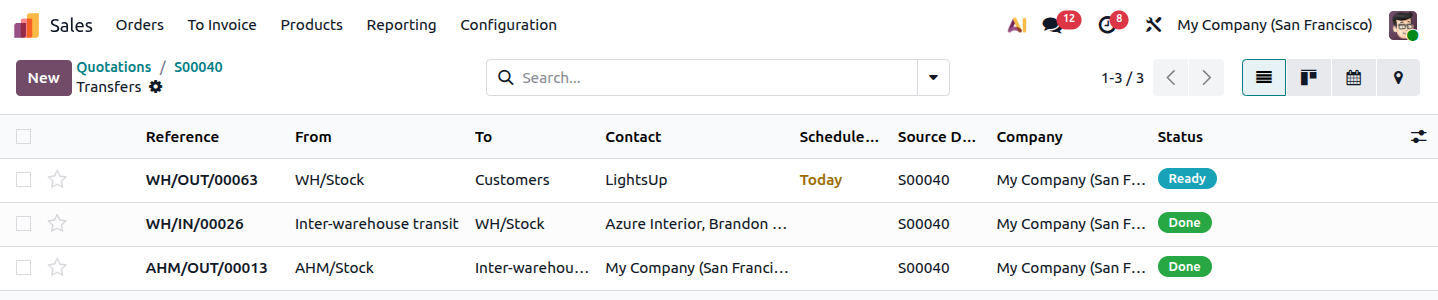 Image :- product-transfer_7.png
Inter-Warehouse Transfer Summary
Odoo’s inter-warehouse replenishment process provides a structured way to fulfill customer orders when stock is unavailable in the destination warehouse. By using configured warehouse routes, businesses can coordinate inventory movement between warehouses while keeping the original customer delivery connected to the replenishment process.
This approach provides better visibility of stock movement, including inventory that is currently in transit between warehouses. It also reduces manual warehouse operations, improves inventory coordination, and helps ensure that customer orders can be fulfilled from available stock across the organization’s warehouses.
Overall, inter-warehouse replenishment helps businesses maintain better control over distributed inventory while supporting a more efficient and reliable order fulfillment process.
A complete workflow diagram for clarity :-
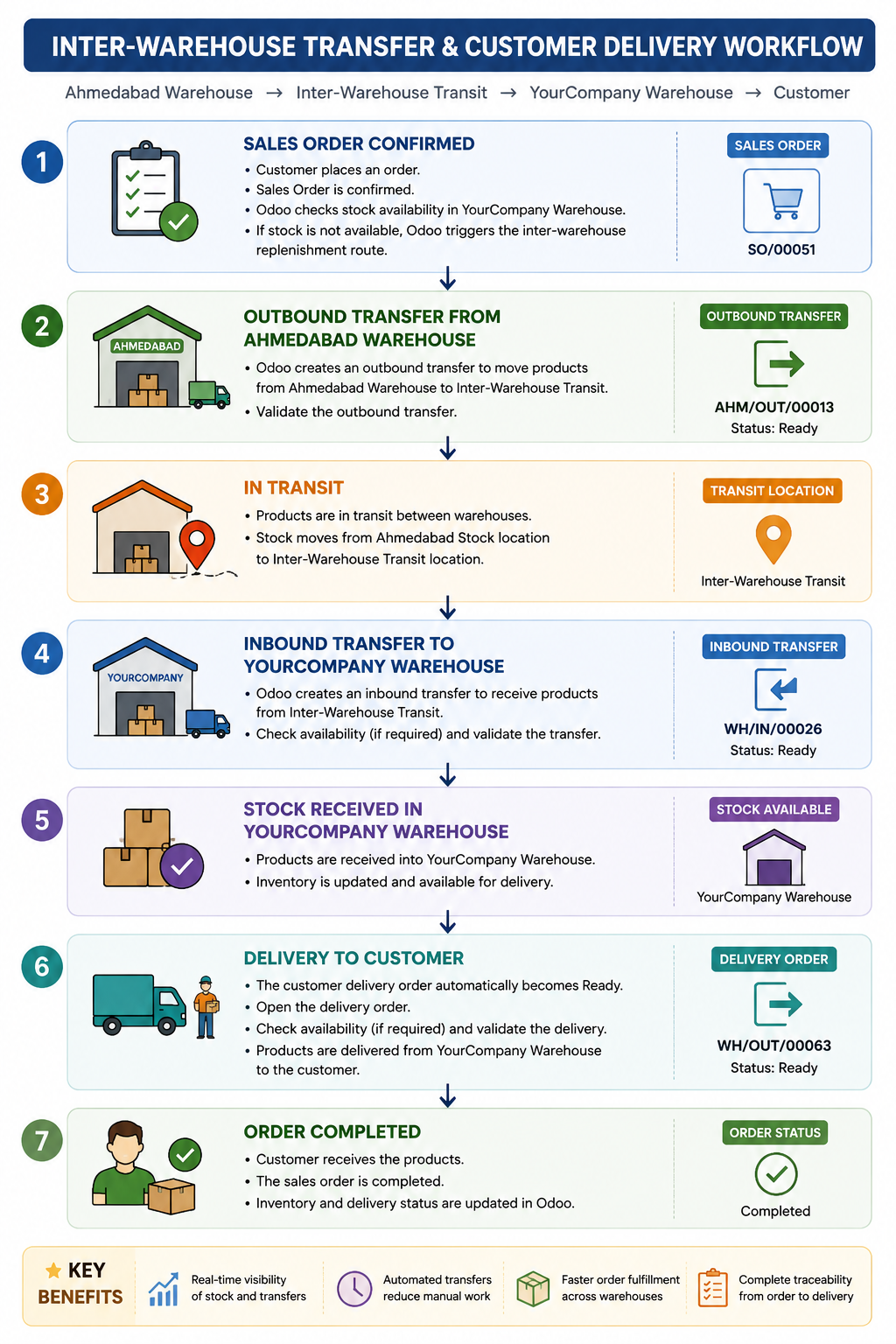 Image :- process-flow.png
