






Odoo Dropshipping Workflow
Workflow Overview
Dropshipping is a retail fulfillment model in which the seller never physically stocks, holds, or handles the products they sell. Instead, when a customer places an order on the seller's online store, the seller forwards the order details directly to a third-party supplier or manufacturer, who then packs and ships the product straight to the customer's address.
The customer relationship, order fulfillment, and supplier relationship remain connected throughout the process — even though three separate parties (customer, seller, supplier) are involved and the product moves only once, directly from supplier to customer.
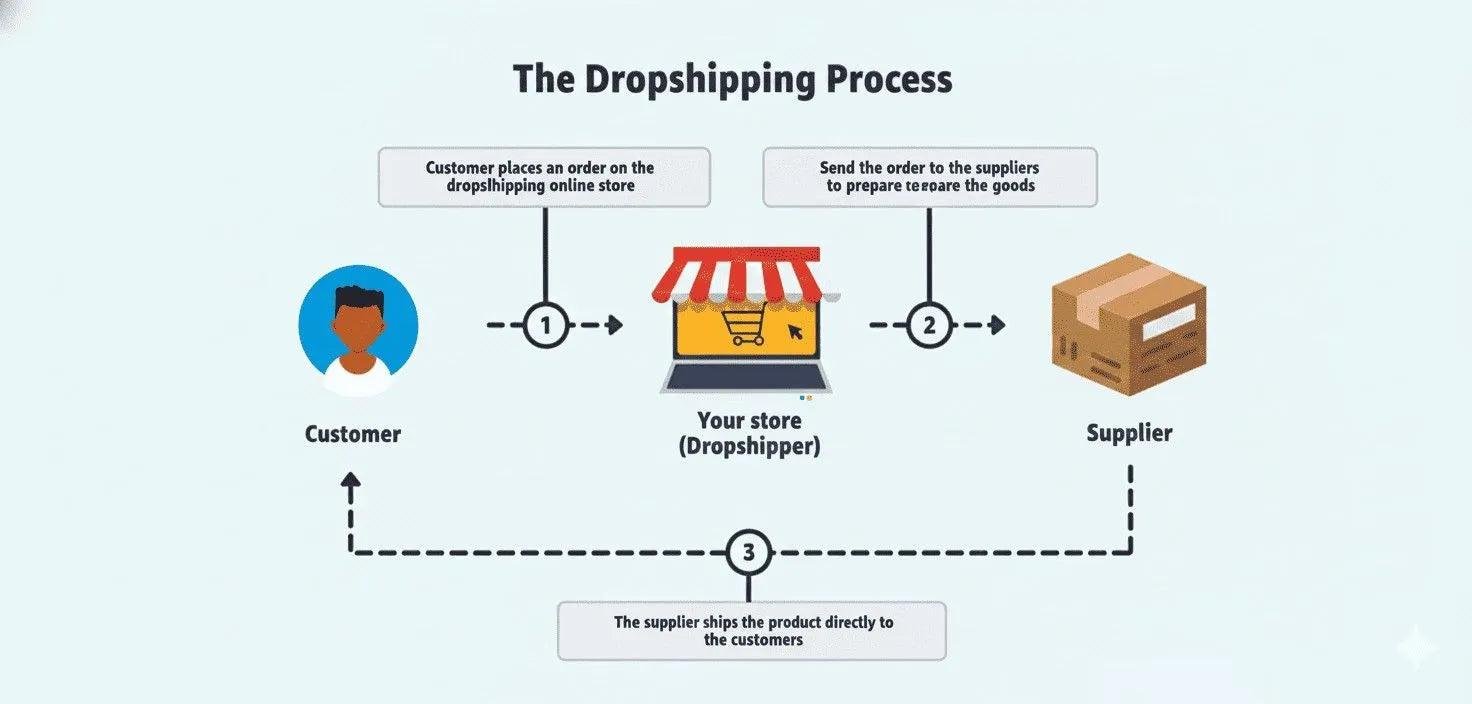 [Image 1 – dropship_flow.png]
Configuration Required
Enable the Dropshipping Feature
The Dropshipping feature must be enabled before configuring products for direct vendor fulfillment.
Under the Logistics section, enable: Dropshipping
Then click Save.
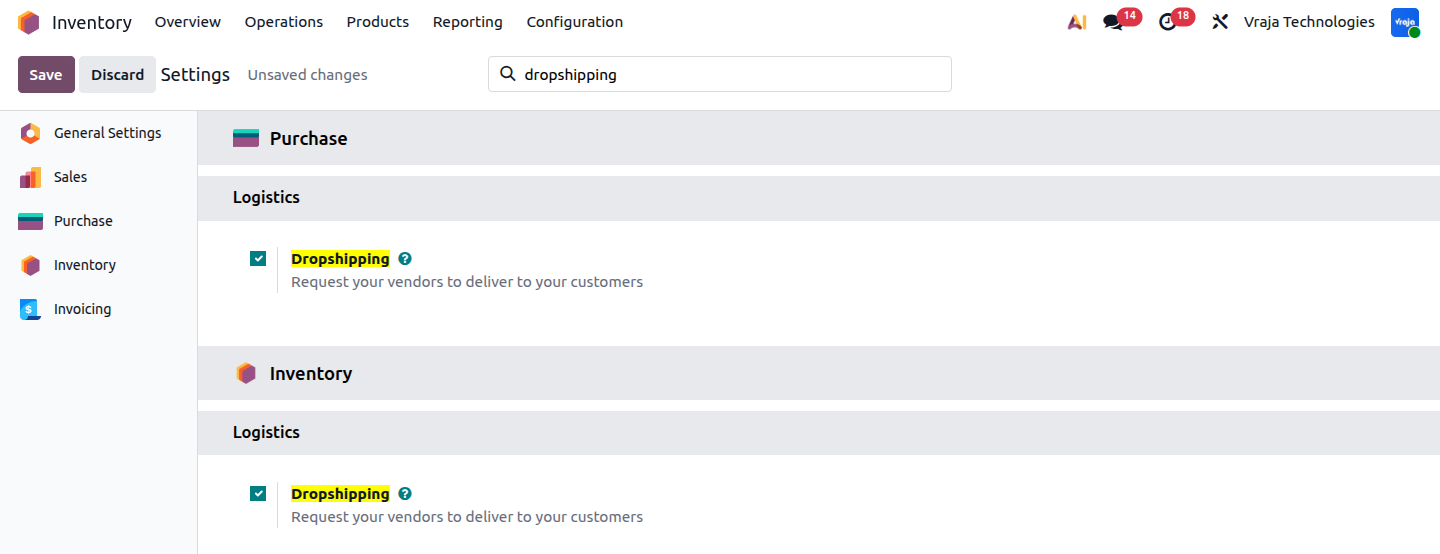 [Image - dropshipping_config.png]
This setting enables the standard Dropshipping functionality in Odoo.
The Dropship route is provided by Odoo when the Dropshipping feature is enabled. The route does not need to be created manually for the standard Dropshipping workflow.
The configuration starts with:
Configure the Product Vendor
The product must have a vendor configured under the Purchase tab.
configure the vendor with this details:
Vendor name
Product Quantity
Vendor purchase price
Vendor lead time
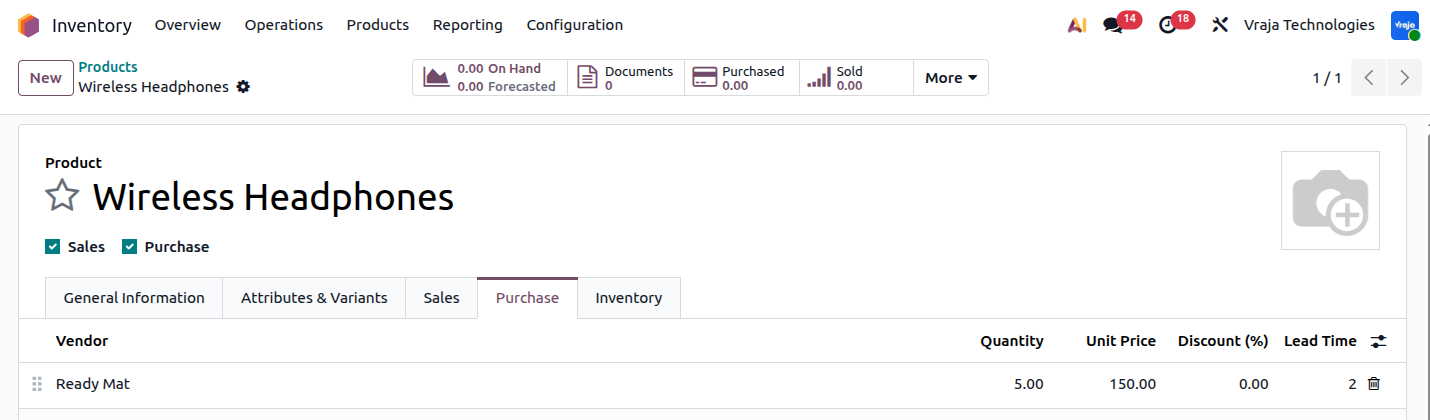 [Image - product_config.png]
In this example, Wireless Headphones is purchased from the vendor Readmate. The vendor's name, price, quantity, and lead time are entered on the Purchase tab as shown below.
The product is purchased from the configured vendor with the vendor price and lead time maintained on the product.
Odoo uses this vendor information to determine:
Which vendor should receive the RFQ
The purchase price
The purchase unit
The expected delivery date
Applicable vendor minimum quantities
A valid vendor configuration is required because Odoo uses the vendor information to create the purchasing requirement generated from the customer order.
Configure the Product for Dropshipping
The product must be configured to use the Dropship route.
Open the required product go to Inventory Tab and enable the Dropship route under the product's Inventory configuration.
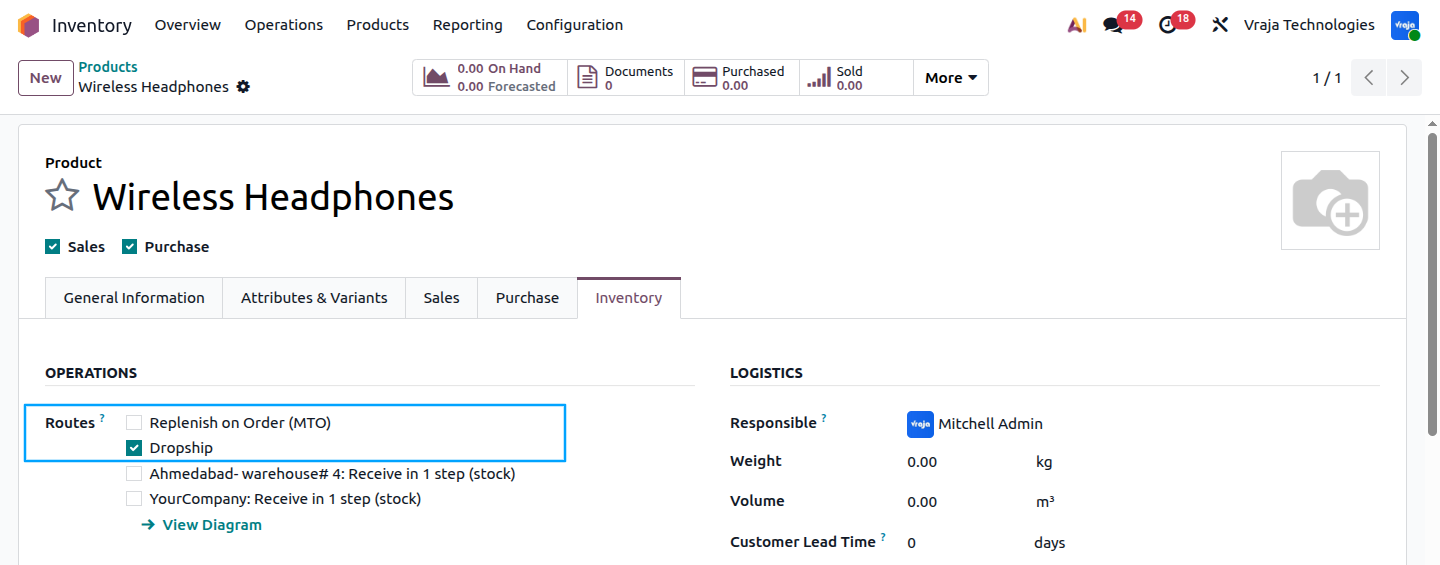 [Image - route_config.png]
The standard Dropship route is selected for the product.
The product should also be configured as:
Can be Sold
Can be Purchased
The Dropship route tells Odoo that the product should be purchased from the vendor and shipped directly to the customer instead of being received into the company's warehouse.
The product configuration therefore creates the following flow:
Complete Transaction Workflow
Step 1: Customer Places an Order
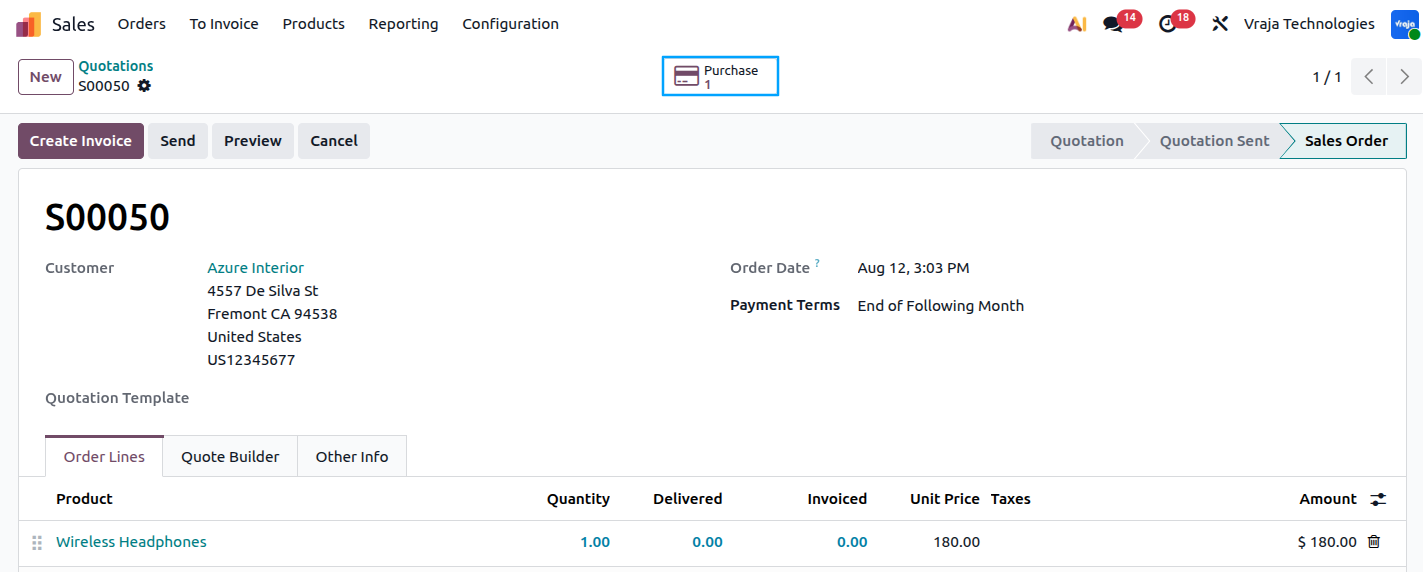
A sales quotation is created for the customer with:
Product: Wireless Headphones
Quantity: 1
The customer wants to purchase the Wireless Headphones from the seller.
 [Image - SO.png]
Once the quotation is confirmed, Odoo identifies that the product is configured with the Dropship route.
Because the product uses the Dropship route, Odoo automatically creates the required Purchase Order for the configured vendor.Here in the image you can see the purchase order has been created for this sale order.
The Sales Order and the vendor purchase remain connected throughout the transaction.
The workflow becomes:
Step 2: Odoo Creates the Vendor RFQ
 [Image - PO.png]
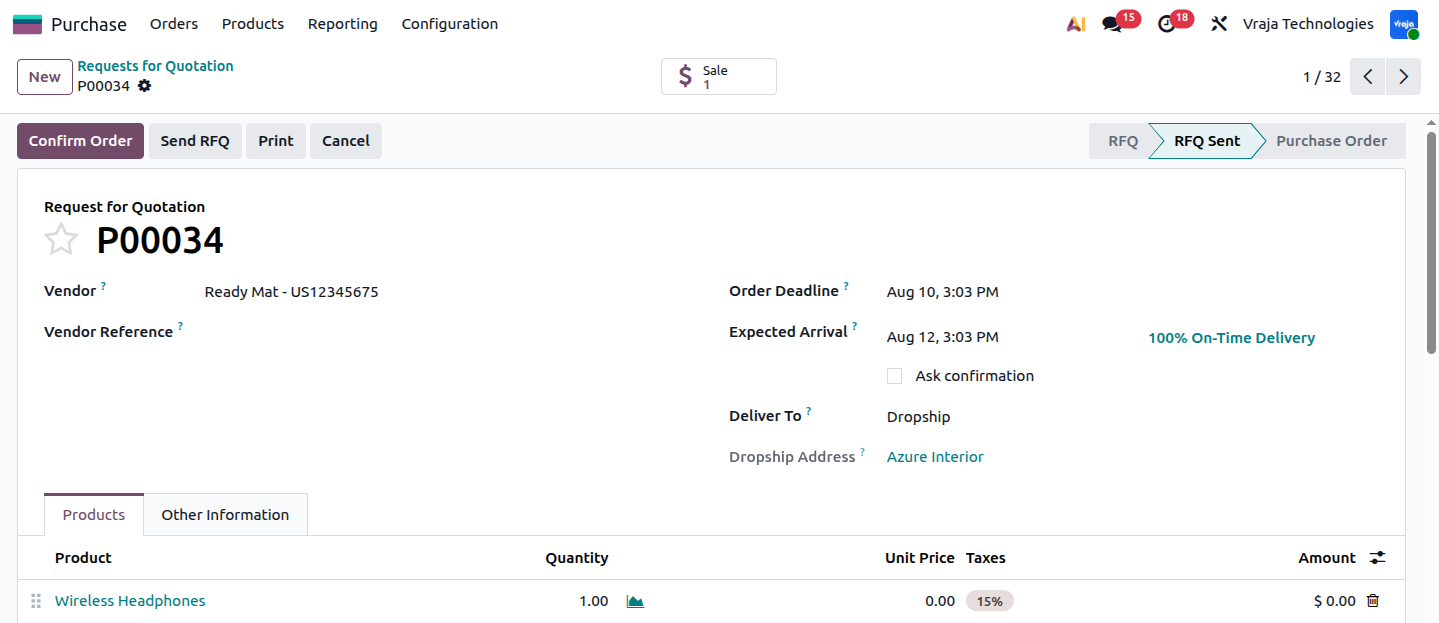
After the Sales Order is confirmed, Odoo automatically creates an RFQ for the configured vendor.
In this example, the vendor is: Readmate
The RFQ contains:
Vendor
Product
Required quantity
Purchase unit
Expected delivery date
Customer delivery information
For example:
Product: Wireless Headphones
Quantity: 1
Vendor: Readmate
Odoo creates the RFQ because the customer order needs to be fulfilled through the Dropship route.
The purchased product is not intended to be received into the company's warehouse. Instead, the vendor will ship the product directly to the customer.
The Purchase Order confirms that the company is purchasing the Wireless Headphones from Readmate to fulfill the customer's order.
The Purchase Order remains connected to the original Sales Order.
This connection allows users to trace the transaction from:
Step 3: Odoo Creates the Dropship Operation
 [Image - dropshipping.png]
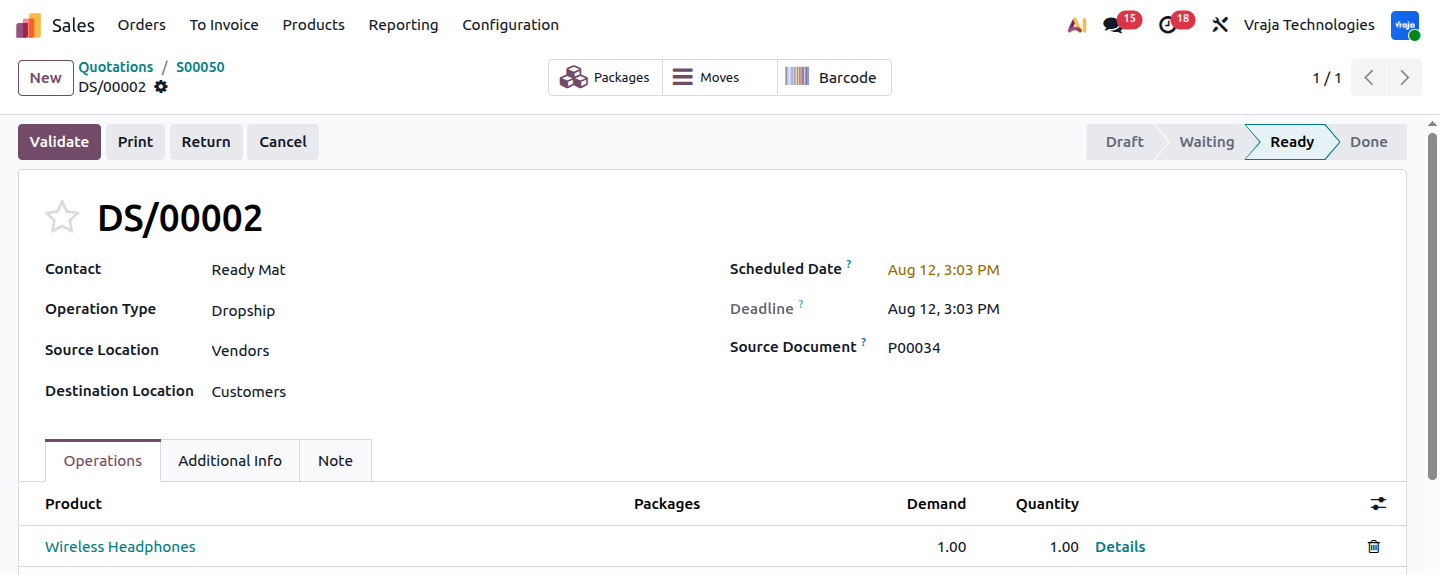
After the Purchase Order is confirmed, Odoo creates the related Dropship operation automatically.
The Dropship operation contains the information required to move the product from the vendor to the customer.
It includes:
Product
Demand quantity
Source vendor
Customer destination
Related Purchase Order
Related Sales Order
In this example:
Product: Wireless Headphones
Quantity: 1
Source: Readmate
Destination: Customer
The important point is that the destination is the customer rather than the company's warehouse.
The physical product flow is:
Readmate → Customer
The product does not need to pass through:
Step 4: Vendor Ships the Product Directly to the Customer
The vendor receives the confirmed Purchase Order and prepares the product for shipment.
In this example, Readmate packs the Wireless Headphones and ships them directly to the customer.
The vendor does not send the product to the company's warehouse.
The physical movement is:
The company therefore does not need to:
Receive the product
Store the product
Pick the product
Pack the product
Ship the product
The vendor handles the physical fulfillment of the order.
Step 5: Validate the Dropship Operation
 [Image - 8 – Do_done.png]
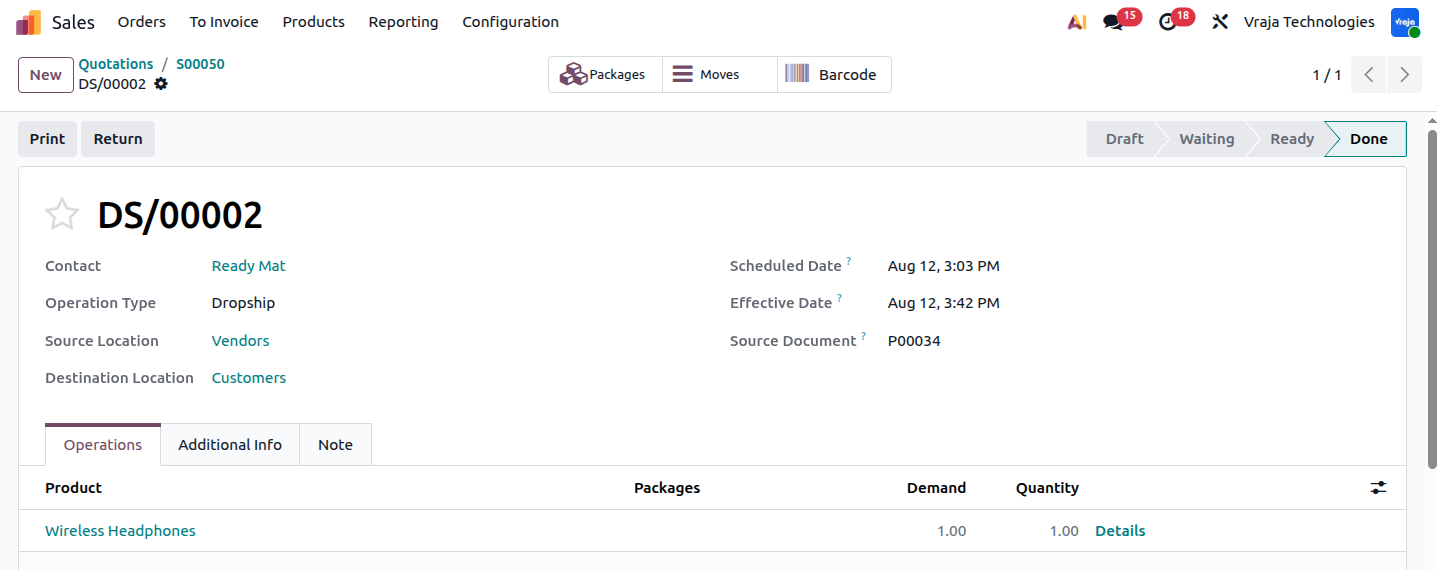
Once the vendor has shipped the product, the related Dropship operation is processed and validated in Odoo.
The operation contains:
Demand: 1
Quantity: 1
Source: Readmate
Destination: Customer
After validation, Odoo records the completed stock movement for the Dropshipping transaction.
The product is not received into the company's warehouse because the Dropship operation represents the direct movement from the vendor to the customer.
The completed physical flow is:
Readmate → Customer
Step 6: Customer Receives the Product
The vendor delivers the Wireless Headphones directly to the customer.
For example:
Vendor: Readmate
Product: Wireless Headphones
Quantity: 1
Destination: Customer
The customer receives the product directly from Readmate.
The company's warehouse is not involved in the physical shipment.
The Odoo transaction remains connected through:
This allows the company to track the fulfillment even though it never physically handles the product.
Step 7: Create the Vendor Bill
After the vendor fulfills the order, the company receives the vendor bill from Readmate.
For example:
Vendor: Readmate
Product: Wireless Headphones
Quantity: 1
Purchase Price: $150
The vendor bill records the amount that the company must pay to the vendor.
The purchase transaction is therefore: Company → Vendor
The company invoices the customer according to its configured invoicing policy.
The company pays the vendor according to the agreed payment terms.
Who Should Use This Workflow?
E-commerce Businesses
E-commerce businesses can use Dropshipping when they want to sell products without maintaining those products in their own warehouse.
It is particularly useful for businesses managing:
Large product catalogs
Supplier-fulfilled products
Low-volume products
Specialized products
Products with predictable vendor lead times
Products that are expensive to store
Wholesale and Distribution Companies
Wholesale and distribution companies can use Dropshipping when their vendors can ship products directly to their customers.
This allows the company to fulfill customer orders without receiving every product into its warehouse.
The workflow maintains a clear connection between:
Customer order
Vendor purchase
Vendor shipment
Customer delivery
Businesses With Limited Warehouse Capacity
Businesses with limited warehouse space can use Dropshipping for products that are bulky, expensive, slow-moving, or difficult to store.
Instead of receiving these products into the warehouse, the company can have the vendor ship them directly to the customer.
This reduces the amount of warehouse space required for these products.
Businesses With Large Product Catalogs
Companies selling a large number of products may not want to maintain inventory for every product.
Dropshipping allows them to offer additional products while relying on vendors to fulfill customer orders.
This helps reduce the amount of capital tied up in warehouse inventory.
Special-Order Businesses
Businesses that sell products only after receiving a customer order can use Dropshipping for direct vendor fulfillment.
Examples include:
Custom equipment
Commercial furniture
Industrial components
Specialty products
Large products
Vendor-specific products
Special-order products
The company can confirm the customer's order and have the vendor ship the product directly to the customer.
Business Result
The Dropshipping workflow creates a controlled connection between customer demand and direct vendor fulfillment.
Instead of receiving products into the warehouse, storing them, picking them, packing them, and shipping them to the customer, Odoo connects the customer order with the vendor purchase and direct customer shipment.
The physical product movement is: Vendor → Customer
This workflow is especially valuable for e-commerce companies, wholesalers, distributors, trading companies, businesses with large product catalogs, and companies that want to reduce warehouse storage and handling requirements.
The main benefit is that the company can fulfill customer orders without physically receiving or storing the products in its own warehouse.
SEO Section
Meta Title : Odoo Dropshipping Workflow | Ship Direct from Vendor to Customer
Meta Description : Learn how Odoo's Dropshipping route lets vendors ship products straight to your customers, so you can fulfill orders without ever stocking the inventory yourself.
Target Keywords:
Odoo dropshipping
Odoo dropship route
dropshipping workflow
vendor direct shipping
Odoo purchase order automation
dropship fulfillment process
Odoo RFQ automation
vendor to customer shipping
Odoo e-commerce fulfillment
third-party supplier shipping
direct shipping

