





AI-Built Odoo Apps: What Developers Still Check Before Go-Live
This guide is for business owners, IT managers and operations leads who have built, or plan to build, Odoo apps with AI tools. It covers what AI does well, where it breaks inside Odoo, and what a developer review involves. Vraja Technologies is an Odoo partner in Rajkot, India, founded in 2019. We began by publishing apps on the Odoo App Store and now customize and integrate Odoo for businesses globally, so the checks below come from that kind of work.
AI for speed, innovation and growth. Experienced developers for security, quality control, and reliability.
Do You Need a Developer to Review Your AI-Built Odoo App?
| Your app | AI alone? | Developer review? |
|---|---|---|
| Prototype to test an idea, no real data | Fine | Optional |
| Internal tool for one team, no sensitive data | Usually fine | Quick check before rollout |
| Writes to sales, inventory, purchase or accounting records | No | Required |
| Connects to carriers, EDI partners, an online store or another system | No | Required, plus integration testing |
| Holds customer or employee data, or has portal or public users | No | Required, with a security review |
What Does It Mean to Build an Odoo App With AI?
In Odoo, AI app development means describing what you need in plain language and letting an AI coding assistant, such as Cursor or GitHub Copilot, write the Odoo module for you. An Odoo module is a package of Python and XML files that adds models (data tables), views (screens), menus, logic and security rules. When people accept generated code without reading it line by line, the practice is often called vibe coding.
AI does real work here. It can produce a working first version in hours, build a prototype so you can test an idea before spending budget, and write the repetitive parts such as fields, forms and simple reports. Nothing in this guide argues against that. The question is what happens after the draft works.
Why Isn’t “It Runs” Enough for an Odoo App?
Veracode’s October 2026 update improved that to 38% of tasks with a flaw, and the best models passed 73% of tests. Python, the language Odoo modules are written in, passed 64%. These are general coding benchmarks, not Odoo tests, so read them as a signal and not a prediction for your app. Even at the improved rate, close to four tasks in ten produced code a security scan flagged.
In an Odoo app, the failures tend to look like this:
| Where it breaks | What it looks like in Odoo |
|---|---|
| Workflow logic | An approval skips budget limits or rejected requests |
| Access control | A salesperson opens another team’s records |
| Module conflicts | Two modules override the same method or view |
| Integrations | A retry creates the same order twice |
| Performance | A report that takes seconds on 50 records takes minutes on 50,000 |
| Upgrades | The module blocks the move to the next Odoo version |
What Do Developers Check Before an AI-Built Odoo App Goes Live?
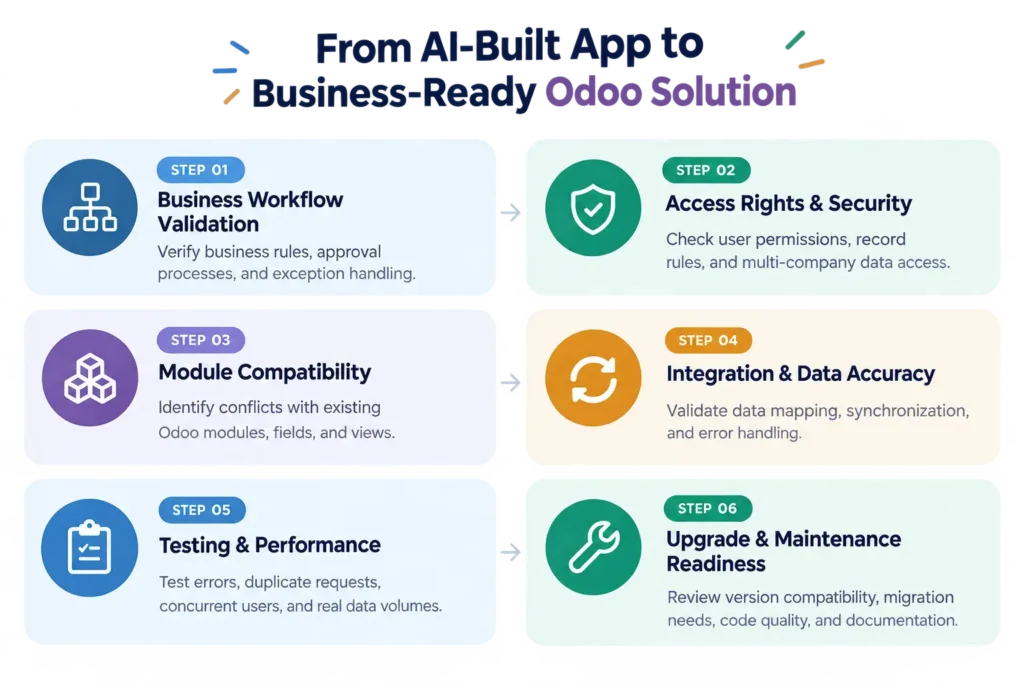
Developers check six things: workflow fit, access control, conflicts with installed modules, integrations, testing beyond the happy path, and upgrade and maintenance readiness. Each one catches problems that a one-user demo never shows.
1. Does the App Follow Your Real Workflow?
A developer sits down with the people who run the process and compares it with what the app does. AI builds from the requirements you gave it, and most requirements describe the normal case.
Take a purchase approval app. It may handle an ordinary request correctly and still fail on multi-level approvals, budget limits or a rejected request that needs to go back to the requester. Ask the team to list every exception they handle in a normal month, such as partial deliveries, returns and rush orders, then test each one against the app.
2. Are Access Rights and Record Rules Correct?
Odoo controls access in two layers, and AI drafts often get the second one wrong. Access rights decide which user groups can read, create, edit or delete a model at all; if no access right matches, the user has no access. Record rules then limit which individual records a user can see, and according to the Odoo security documentation they are default-allow: if access rights grant access and no rule applies, the user can reach every record.
So a module can pass every demo with one admin user and still show all orders to every salesperson, because nobody wrote a rule. An access line with no group assigned grants access to every user, including portal and public users. Multi-company setups need rules based on the companies each user is allowed to see.
A developer also searches the code for shortcuts. sudo() ignores access rights and record rules, and raw SQL queries bypass them. Public methods can be called remotely with any parameters, so their inputs cannot be trusted. The practical test in any Odoo app security review is to log in as each role, and as a user from a second company, and try to read, edit, and delete records that should be off limits.
3. Does It Clash With the Modules You Already Run?
Odoo modules extend standard models instead of replacing them, so two modules can collide. Both may override the same method, add a field with the same name or change the same view. An AI tool only sees the code you show it, not the other modules installed in your database.
The check is to install the app on a staging copy of your production database, read the server logs, and run your standard flows end to end: create a quote, confirm the order, deliver, post the invoice. Then confirm the inherited views still render for every user group.
4. Does It Connect Cleanly to Other Systems?
If the app exchanges data with a carrier, an EDI partner, an online store or another system, the developer checks what happens when things go wrong, not only when they go right. A sync that retries after a timeout can create the same order twice. A field mapped to the wrong target can corrupt stock or pricing for weeks before anyone notices.
This is where integration experience matters most. In our EDI integration work, for example, a retail partner can reject a document over one wrongly mapped field, so mapping errors surface fast. The same discipline applies to any connection: define the data mapping, make repeated requests safe, and test failures on purpose.
5. Has It Been Tested Beyond the Happy Path?
A developer tests for bad input, duplicate requests, concurrent users and realistic data volumes, and does not rely on tests the AI wrote itself. The OWASP Secure Coding with AI cheat sheet warns that AI agents can turn a failing test suite green by deleting tests, weakening checks or mocking the thing being tested. A passing suite written by the same AI that wrote the code is not independent proof.
OWASP lists two more problems that apply to any AI-built app. AI assistants frequently suggest software packages that do not exist, and attackers register those names with malicious code. They also suggest older dependency versions that already have known vulnerabilities. A developer checks every dependency in the module and runs a vulnerability audit before go-live.
For performance, load the app with your full product list and a year of orders, not ten demo records.
6. Can It Survive an Odoo Upgrade and Be Maintained?
Not automatically. The Odoo upgrade documentation states that a database with custom modules cannot be upgraded until a version of each custom module exists for the target Odoo version. AI models learn from older code, so a draft can also use patterns from an earlier Odoo release that no longer fit.
A developer checks which Odoo version the code targets, whether data changes need migration scripts, and whether the code sits in version control with documentation. Someone also has to own the module after the AI session ends. OWASP puts it plainly: every AI-generated change needs a human owner who reviews it and answers for it. Our Odoo migration work covers upgrades for custom modules.
What Does This Look Like in Practice?
The problems usually appear only after a second user, a second company or a second system is involved. Here is an illustrative scenario, not a client case.
A wholesale distributor asks an AI tool for an order-approval module. In a demo with one user it works: orders are captured, approvals run, invoices generate. A developer review then finds five problems:
- Orders above a customer’s credit limit skip the approval step.
- Salespeople in one company can open another company’s orders, because no multi-company rule exists.
- A retry after a network timeout creates a duplicate order in the connected online store.
- A custom field name collides with a field from an installed shipping module.
- The module has no migration path for the next Odoo version.
None of these shows up in a one-user demo. All five are fixable in an afternoon or two of developer time if found before go-live, and far more expensive once orders are flowing.
Should You Use AI, a Developer, or Both?
| Option | Best for | Trade-off |
|---|---|---|
| AI only | Prototypes and single-team tools with no sensitive data | Hidden flaws surface after go-live |
| AI draft plus developer review | Anything touching orders, stock, accounting or integrations | Needs a developer who reads code carefully |
| Developer-built from scratch | Core processes where the AI draft’s data model is wrong | Slower start and higher cost |
If you want a partner for an Odoo custom module review or for what comes after it, our Odoo customization team handles changes on top of standard Odoo, and you can bring in extra capacity through Hire Odoo Developer.
How Can You Check an AI-Built Odoo App Before Hiring Anyone?
You can run a basic self-check in a few hours with a staging copy of your database and a list of your users’ roles. Work through these seven questions:
- Have you written down every workflow step and exception, and tested each one?
- Have you logged in as every user role and tried to see or change records that should be hidden?
- If you run several companies, have you tested with users from two of them?
- Is the app installed on a staging copy, not on production?
- Have you reviewed the dependency list for packages you don’t recognize, and run an audit tool?
- Have you tested every integration with a retry, a timeout and a bad input?
- Can someone explain where the code lives and how it will be updated for the next Odoo version?
This is a first screen, not a security certification. If any answer is no, or you can’t tell, that is the part to hand to a developer.
Why Work With Vraja Technologies?
Vraja Technologies is an Odoo partner in Rajkot, Gujarat, India, that builds apps for the Odoo App Store and delivers Odoo implementation, customization, migration, integration and support. If you are weighing a review of an AI-built app, this is what clients typically look for, and what we provide:
- In-house developers. Everyone who works on your project is a Vraja employee, not a freelancer or an outsourced vendor.
- Integration experience. Shipping connectors for 60+ carriers, EDI with ANSI X12 and EDIFACT, and Shopify, BigCommerce and WooCommerce connectors.
- Apps we maintain ourselves. The developers who build custom modules also maintain our App Store apps across Odoo versions.
- Published support terms. Support hours, the free-support period and refund conditions are on our Support Policy page.
- Direct access. You can reach us by email, Microsoft Teams, WhatsApp or phone.
If you have an app built with AI and want a developer to review it, talk to our team for a scoping call.
Conclusion
Use AI to build the first version of your Odoo app. Have a developer review it before go-live if it writes to orders, stock, invoices or customer data, connects to another system, or has portal users. Skip the review only for throwaway prototypes and small internal tools with no sensitive data. AI-built Odoo apps get you to a working draft quickly, and the review is what makes that draft safe to run your business on.
Frequently Asked Questions
Can AI build an Odoo module?
Yes. An AI-generated Odoo module can be drafted in hours, including models, views and basic logic. The draft still needs a developer to check security, workflow fit and compatibility before it handles real data.
Is AI-generated code safe to use in Odoo?
Not by default. Veracode’s October 2026 update found 38% of tested coding tasks produced code with a security flaw. Treat AI output as untrusted until it has been reviewed and scanned.
Do I still need a developer if AI wrote the whole app?
If the app writes to business records, connects to another system or holds personal data, yes. For a small internal tool with no sensitive data, a quick check by someone who knows Odoo is often enough.
Can a developer fix an AI-built app without rebuilding it?
Often, yes. If the data model matches your process, fixing access rules, edge cases and conflicts is usually quicker than a rebuild. If the data model is wrong, a rebuild may be the cheaper path.
What should I give a developer to review my AI-built Odoo app?
Send the source code from version control, your Odoo version, the list of installed modules, the original requirements or prompts, and a few sample records. A staging copy of your database makes the conflict and performance checks much faster.
Will an AI-built app work after an Odoo upgrade?
Not automatically. Odoo’s upgrade documentation says custom modules must have a version for the target release before a database that uses them can be upgraded, and data changes may need migration scripts.
Which Odoo security checks matter most for AI-built modules?
Check access rights, record rules, multi-company rules, any use of sudo() or raw SQL, and the inputs of public methods. These are the places where a module can work in a demo and still expose data.
Can AI review its own code instead of a developer?
It can catch some issues, but OWASP states that AI review is not a substitute for human review. Tests and reviews written by the same AI that wrote the code are not independent evidence that the app is correct.