MCP Server Explained: What It Is, How It Works, When to Use It & Setup Guide
An MCP server is a lightweight program that exposes tools, data, and prompts to AI applications through the Model Context Protocol (MCP), an open standard that Anthropic introduced in November 2024. It lets an AI agent discover and call approved actions, such as looking up an Odoo sales order, without a custom integration for every model and every application.
Use an MCP server for AI agents when they need live, permission-controlled access to business systems such as Odoo, a CRM, or a shipping platform. Skip it when a fixed workflow or a plain API call already does the job. This guide from Vraja Technologies covers the definition, request flow, use cases, setup steps, security controls, and the Odoo-specific details that most explainers leave out.
What Is an MCP Server? A Clear Definition
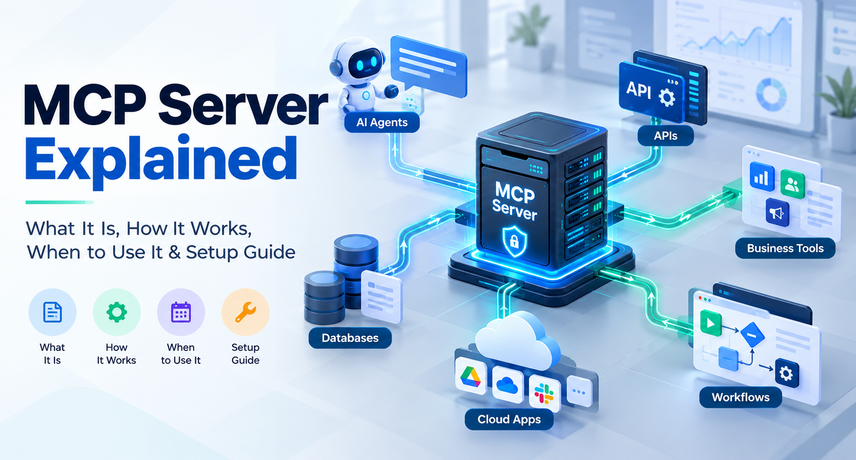
An MCP server is a program that sits between an AI application and an external system and exposes that system’s capabilities in the format defined by the Model Context Protocol. The AI model never touches the database or API directly. It asks the server to run an approved action and receives a structured result.
Anthropic open-sourced the protocol on November 25, 2024, and donated it to the Agentic AI Foundation (AAIF), a directed fund of the Linux Foundation, on December 9, 2025. At that point Anthropic reported more than 10,000 active public servers and adoption by ChatGPT, Cursor, Gemini, Microsoft Copilot, and Visual Studio Code. A shared standard is the reason one server can work across all of those clients.
MCP Server vs. MCP Client vs. Host
The host is the AI application a person uses, the client is the connector inside that host, and the server is the program that exposes the outside system. Each client maintains a connection to one server, so a single host can talk to several servers at once, for example one for Odoo and one for a shipping carrier.
The Model Context Protocol itself is the rulebook. A server is one implementation of that rulebook for a specific system, which is why a team can run many of them without many different integration styles.
MCP Server vs. API: What Is the Difference?
A traditional API exposes a system’s functions to developers who write code against it, while an MCP server wraps that API so an AI model can discover and call those functions at runtime. The server does not replace your API. It sits on top of it.
| Feature | Traditional REST or JSON API | MCP Server |
|---|---|---|
| Main Consumer | Developer-written applications | AI models accessed through host applications |
| Discovery | Developers typically consult API documentation and implement requests. | MCP clients can discover available tools, descriptions, and input schemas at runtime. |
| Reuse | Custom integration code is often required for each application. | A compatible MCP server can be reused by multiple MCP clients. |
| Authorization | API keys, OAuth, or other authentication methods configured for each integration. | Remote servers can use OAuth-based authorization; host applications can also manage user consent and permissions. |
| Best For | Deterministic, high-volume workflows and direct system-to-system integrations. | Agent-driven tasks that need flexible tool selection, contextual reasoning, and judgment. |
How MCP Server Works: The Request Flow Step by Step
An MCP server works by advertising a list of tools, resources, and prompts. The AI model picks one based on the user’s request, the client sends a JSON-RPC 2.0 message, and the server runs the action against the backend system and returns a structured result.
Here is how MCP server works in five steps:
- Discovery: the client asks the server which tools it offers and receives each tool’s name, description, and input schema.
- Selection: the model chooses the tool that fits the request and generates arguments that match the schema.
- Consent: the host shows the planned action and asks the user to approve anything sensitive.
- Execution: the server validates the arguments, applies permissions, and calls the backend, such as Odoo’s JSON-2 API.
- Response: the server returns structured content, and the model uses it to answer or to chain another call.
What Are Tools, Resources, and Prompts?
Tools are actions the model can invoke, resources are read-only data the host can attach as context, and prompts are reusable templates a user can trigger. Most business deployments start with tools because tools answer questions and perform tasks.
In an Odoo context, a tool might search open quotations, a resource might expose the product catalog, and a prompt might package a weekly overdue-invoice summary that sales managers run on demand.
Which Transport Does MCP Use: stdio or Streamable HTTP?
Local servers use stdio, where the host launches the server as a child process, and remote servers use Streamable HTTP, which replaced the older HTTP+SSE transport in the March 2025 specification.
Use stdio for a laptop pilot. Choose Streamable HTTP when several users or agents share the server, because that is the path where the specification’s OAuth-based authorization applies.
What Changed in the 2026-07-28 MCP Specification?
The 2026-07-28 revision made the protocol stateless. It removed the initialize handshake and the protocol-level session, so every request now carries its own protocol version and client capabilities.
Stateless requests are easier to spread across multiple server instances behind a load balancer, as the Agentic AI Foundation notes. They also mean older tutorials that describe a handshake and session state are describing the earlier 2025-11-25 behavior. Vercel, for example, serves both protocol versions from one endpoint during the transition. Confirm which revision your SDK and AI clients support before you build.
Why Do AI Agents Need an MCP Server?
AI agents need an MCP server because a model alone cannot see live business data or take action in your systems. The server gives the agent a governed, discoverable path to both.
Before MCP, every pairing of AI application and business system needed its own connector, which Google Cloud calls the “N x M” problem. A shared protocol reduces that to one server per system. If you are new to autonomous agents, start with our guide to AI agents, then return here. An MCP server for AI agents also gives you one place to enforce permissions and keep an audit trail, instead of scattering credentials across scripts.
MCP also differs from retrieval-augmented generation (RAG). RAG retrieves information to improve an answer, while MCP also lets the model perform actions in external systems. The two are complementary rather than competing.
MCP Server Use Cases for Odoo and Connected Business Systems
The strongest MCP server use cases are conversational lookups and approval-gated actions across ERP, CRM, inventory, finance, and logistics data. Each example below is illustrative and should start as read-only.
| Function | Example Agent Request | System | Tool Access and Controls |
|---|---|---|---|
| Sales | “Which open quotations over $25,000 expire this week?” | Odoo Sales, CRM | Read access; approval required to draft follow-ups for sending |
| Inventory | “Do we have 500 units of this SKU across both warehouses?” | Odoo Inventory | Read access |
| Finance | “List customers with invoices more than 60 days overdue.” | Odoo Accounting | Read access; approval required before sending payment reminders |
| Purchasing | “Draft RFQs for items below the reorder point.” | Odoo Purchase | Write access to draft RFQs; approval required before sending |
| Order Exceptions | “Which EDI or Shopify orders failed validation today?” | Odoo, EDI, eCommerce | Read access to order records, integration logs, and validation errors |
The common thread is that each request varies, crosses a system boundary, and benefits from a human reviewing the outcome. For worked examples of agents inside the ERP, see our walkthrough of AI automation in Odoo. Order exceptions are a sensible first target for teams running EDI, eCommerce, and shipping connectors, because the data already lives in Odoo and failures are costly.
When to Use MCP Server (and When Not To)
Use an MCP server when an AI agent needs live, permissioned access to one or more systems for variable, human-supervised tasks. Do not use one for fixed, high-volume, deterministic flows where a standard integration is faster, cheaper, and easier to audit.
| Scenario | Best Approach | Why |
|---|---|---|
| An assistant answers ad hoc questions across Odoo and a CRM | MCP-based server | Requests vary and involve multiple systems. |
| A manager asks an agent to draft quotes for approval | MCP-based server with approval gates | Write actions remain under human control. |
| Scheduled EDI 850 and 810 exchange with trading partners | Direct EDI integration | Supports deterministic, high-volume exchanges using contractual document formats. |
| Shipping label creation at checkout | Direct carrier API integration | Optimized for low latency and rule-based execution. |
| One-time historical data load | Migration scripts or ETL | No autonomous agent decisions are needed. |
| One AI app calling one simple API | Native function calling | A separate server adds complexity without meaningful reuse. |
Ask three questions before you commit:
- Does the task change from request to request?
- Will more than one AI client need the same access?
- Can you define a least-privilege scope for it?
Three yes answers point to building one.
MCP Server Setup: Step-by-Step Guide
To set up an MCP server, define one narrow use case, choose how to build or source the server, create a least-privilege account in the backend system, define strict tool schemas, test with the official inspector, and connect an AI client with approval gates for write actions.
The steps below use Odoo as the example backend, but the sequence applies to any connected business system.
Step 1: Define a Narrow, Read-Only Use Case
Pick one question your team asks repeatedly, such as the status of a specific sales order, and expose only the read tool that answers it. A narrow scope keeps the permission model simple and makes success measurable.
Step 2: Decide Whether to Build, Adopt, or Buy
Build with an official SDK, adopt an open-source server, or use a managed gateway, depending on how much control and risk you can accept. Official SDKs exist for all major programming languages, and community-built Odoo servers already cover recent versions. Review third-party code carefully, because tools run with the credentials you give them. Vraja Technologies can scope a custom build when off-the-shelf code does not fit your security model.
Step 3: Prepare Odoo Access
Create a dedicated integration user with only the access groups the use case needs, then generate an API key for that user under Preferences, Account Security, New API Key.
On Odoo 19 and later, call the External JSON-2 API at /json/2/<model>/<method>. XML-RPC and JSON-RPC are deprecated as of Odoo 19, and Odoo’s documentation schedules removal of the object services for Odoo 22 in fall 2028. On Odoo Online, external API access is limited to the Custom plan, so confirm your plan before you design the pilot.
Step 4: Define Tools with Strict Schemas
Write small, specific tools with clear names, plain-language descriptions, and JSON Schema inputs, and mark each one as read-only or destructive using tool annotations. Avoid a single generic tool that can run any query or call any model method, because it removes every guardrail you just built.
Step 5: Choose Transport and Authentication
Run over stdio for a local pilot and Streamable HTTP for shared use. For remote deployments, the specification requires servers to publish OAuth 2.0 Protected Resource Metadata (RFC 9728) so clients can find the authorization server. Use an established identity provider rather than writing OAuth yourself.
Step 6: Test Before You Connect
Run the server in MCP Inspector, the official testing tool, and exercise every tool with valid, malformed, and unauthorized inputs. Confirm that a user without access to a record cannot retrieve it through the tool.
Step 7: Connect the AI Client and Add Guardrails
Register the server in your AI client, then require user approval for every write action, set rate limits and timeouts, and log each call with the user, tool, arguments, and outcome.
Step 8: Pilot, Measure, and Expand
Run a time-boxed pilot with a small group and track tool-call success rate, latency, denied calls, and user feedback. Add write tools only after the read tools prove reliable.
How Do You Secure an MCP Server?
Secure an MCP server by enforcing least privilege, OAuth-based authorization for remote access, human approval for write actions, input validation, and complete audit logging. Because the server reaches real business data, treat it like any other production integration.
- Least privilege: use one scoped service account per environment and role, and never reuse an administrator key.
- Authorization: use OAuth for remote access, and keep shared static keys out of client configuration files.
- Untrusted content: treat tool descriptions and returned data as untrusted input, since both can carry prompt-injection attempts. Google Cloud advises trusting tool descriptions only from reliable servers.
- Consent: require approval for destructive or financial actions.
- Observability: log user, tool, arguments, result, and latency, and alert on unusual volume.
- Supply chain: vet third-party servers and pin their versions.
- Compliance mapping: list which fields the agent can see and check them against your privacy, payment, and industry obligations.
Repeat the review whenever you add a tool, because each new tool expands what a manipulated prompt could reach.
MCP Integration with Odoo: Architecture and Planning
The recommended pattern for connecting Odoo to AI agents is a server that calls Odoo’s External JSON-2 API with a scoped API key, so Odoo’s own access rights determine what the agent can read or change. Each request runs with the permissions of the user who owns the key.
Which Odoo API Should Your Server Call?
| Odoo Version | API to Use | Note |
|---|---|---|
| 16 to 18 | XML-RPC or JSON-RPC | Legacy integration options. Plan a migration to JSON-2 when upgrading to a compatible version. |
| 19 and Later | External JSON-2 API | Recommended for new integrations, using API keys for authentication. |
| Odoo Online | Custom plan required | External API access is not available on the One App Free or Standard plans. |
Most Odoo environments are not Odoo alone. They also include Shopify or WooCommerce storefronts, EDI networks such as SPS Commerce, carriers such as UPS and FedEx, and accounting tools such as QuickBooks. Plan one server per system, and add a gateway when governance requires central registration, authentication, and monitoring. Vraja Technologies’ Odoo integration services connect Odoo to those systems, and the same API groundwork supports an agent layer on top.
If you are scoping ERP implementation services for a new Odoo rollout, design the agent layer into the architecture from day one so roles, API access, and audit logging are not retrofitted later.
Common Mistakes to Avoid with MCP in Production
- Exposing a generic “run anything” tool instead of narrow, named actions.
- Using an administrator account because it is faster to configure.
- Skipping approval gates on write actions.
- Loading too many tools into one server, which burdens the model’s context and can degrade tool selection.
- Treating MCP as a replacement for deterministic integrations such as EDI or carrier APIs.
- Building against one specification revision without testing the other.
Vraja Technologies can review these failure points during an architecture assessment, so your team fixes permissions, tool scope, and approval flows before any agent touches production data, and well before an incident forces changes.
Next Steps: Put MCP to Work in Your Odoo Environment
Start with one read-only use case, a scoped service account, and a time-boxed pilot. Once the first tool proves reliable, expand carefully and keep approval gates on every write action.
Whether you are planning an Odoo rollout, evaluating ERP implementation services, or adding AI agents to a live environment, Vraja Technologies can review your architecture and help scope a secure first deployment. Our Odoo integration services team works with mid-sized and enterprise companies that run Odoo alongside other business systems.
MCP Server FAQ: Quick Answers
What is an MCP server in simple terms?
An MCP server is a translator that lets an AI assistant safely use another system, such as Odoo, through a standard set of approved actions. The assistant asks, the server checks permissions and performs the action, and the result goes back to the assistant.
Is an MCP server the same as an API?
No. An API exposes functions to developer-written code, while an MCP server wraps an API so an AI model can discover and call those functions at runtime. Most servers call existing APIs underneath.
What does MCP stand for?
MCP stands for Model Context Protocol, an open standard for connecting AI applications to tools and data. A Model Context Protocol server is any server that implements that standard for a given system. It does not stand for “multi-cloud platform” or “modular control plane,” two incorrect expansions that appear in some online articles.
Is an MCP server safe for enterprise data?
It can be, when you enforce least privilege, OAuth for remote access, approval for write actions, and audit logging. Safety depends on your configuration, not on the protocol alone.
Do I need MCP to connect AI to Odoo?
No. A single application can call Odoo’s JSON-2 API directly or use native function calling. A server becomes worthwhile when several AI clients or agents need the same governed access, or when you want standardized discovery and one audit point.
Which AI tools support MCP?
Anthropic’s December 2025 report lists ChatGPT, Cursor, Gemini, Microsoft Copilot, and Visual Studio Code, alongside Claude. Check each vendor’s documentation for the specification revision it supports.
Who governs MCP today?
The Agentic AI Foundation, a directed fund under the Linux Foundation, stewards MCP. It was co-founded by Anthropic, Block, and OpenAI, and changes go through a formal enhancement-proposal process.
Can Vraja Technologies help connect Odoo to AI agents?
Yes. Vraja Technologies can assess your Odoo version, API access, and security requirements, then scope a pilot server with least-privilege access and approval gates.
How long does MCP server setup take?
A read-only pilot against one system is a small project, but total effort depends on tool count, authentication model, and compliance review. Start narrow, then expand once the first tools prove reliable.