
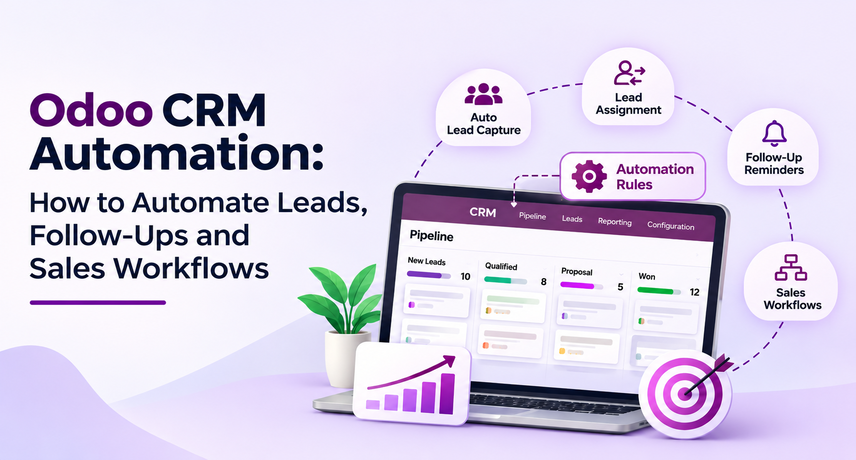
Odoo CRM Automation: How to Automate Leads, Follow-Ups and Sales Workflows
Odoo CRM Automation helps a sales team capture leads, assign them, schedule follow-ups, move opportunities through the pipeline, and connect quotations with the rest of Odoo. For a U.S. B2B company, the practical goal is simple: reduce manual sales administration without losing ownership, context, or control.
The strongest setup starts with a clear sales process, not with automation rules. Define where leads come from, who owns each lead, how quickly the first response should happen, what follow-up sequence is expected, and when an opportunity should move to the next stage. Then use CRM capabilities in Odoo such as rule-based assignment, activities, activity plans, predictive lead scoring, pipeline stages, and automation rules to support that process. Vraja Technologies recommends starting with a small workflow, measuring it, and expanding only after the team trusts the data.
What Is Odoo CRM Automation?
Odoo CRM Automation is the use of Odoo CRM settings, activities, assignment rules, and automation rules to move routine sales work forward with less manual effort. Combined with Odoo AI automation capabilities such as predictive lead scoring, it helps teams focus on the leads most likely to convert.
In practical terms, the system can receive a lead, place it in the right pipeline, assign it to a salesperson, create the next activity, remind the salesperson about follow-up, and keep managers informed. Odoo sales automation does not remove the salesperson from the process. It reduces the small administrative steps that often cause delays.
Odoo’s official documentation shows that CRM can use rule-based assignment repeatedly, activity plans can create a sequence of tasks, and automation rules can trigger actions when defined conditions are met. Predictive lead scoring can also estimate the probability of winning an opportunity from historical CRM data, which is where Odoo AI automation adds the most practical value. These Odoo CRM features give teams several ways to standardize how work moves through the pipeline.
Why Automate Lead and Sales Workflows in Odoo?
The main reason to automate is consistency. Odoo lead management becomes difficult when new enquiries arrive from several sources and every salesperson handles them differently.
A growing B2B sales team may receive leads from website forms, email, trade shows, referrals, ad campaigns, spreadsheets, or partner channels. Without a shared process, some leads get fast attention while others sit untouched. Odoo sales workflow automation can make the first steps predictable: create the record, assign ownership, set a follow-up activity, and make the next action visible.
Odoo sales automation is especially useful when managers need to answer simple questions quickly. Which leads have no next activity? Which opportunities are overdue? Which source creates the best pipeline? Which salesperson has too many open leads? Which quotations need follow-up?
Which Odoo CRM Features Support Sales Automation?
The most useful Odoo CRM features for automation are lead assignment, predictive scoring, activities, activity plans, automation rules, pipeline stages, quotation links, lost reasons, and reporting.
Rule-Based Lead Assignment
Odoo lead management can use assignment rules to send leads or opportunities to the right sales team or salesperson. Odoo documentation also allows repeated automatic assignment at a chosen interval.
Odoo sales automation should use clear rules that sales managers can explain. If the logic becomes too complicated to describe, it will be hard to maintain.
Predictive Lead Scoring
Odoo CRM features include predictive lead scoring, which uses historical CRM outcomes to estimate the probability of winning open opportunities.
Use the score as a prioritization signal, not as the only decision. A new strategic account may deserve attention even if historical data gives it a lower probability. Odoo sales workflow automation works best when scoring supports human judgment instead of replacing it.
Activities and Activity Plans
Activities are follow-up tasks such as emails, calls, meetings, to-do items, document requests, or other actions. Activity plans can schedule a sequence of these tasks around a lead or opportunity.
For example, an Odoo CRM implementation might create a simple plan for qualified inbound leads: call on day one, send a summary email after the call, schedule a product demo, create a quotation task, and follow up three days later. This keeps Odoo lead management consistent without requiring every salesperson to remember the same sequence.
Automation Rules
Odoo sales automation can use automation rules to perform actions when a trigger and conditions are met. Odoo Studio documentation gives examples such as creating an activity when a field reaches a certain value.
Use automation rules for clear, repeatable actions. Examples include creating a task when an opportunity reaches a proposal stage, notifying a manager when a deal exceeds a value threshold, or creating an internal review activity before a quotation is sent. These Odoo CRM features are powerful, so each rule should have an owner and a documented purpose.
How Do You Automate Lead Capture in Odoo CRM?
Start Odoo CRM Automation by bringing every approved lead source into one controlled intake process and keeping the original source information.Odoo lead management should capture enough information for routing and follow-up without asking prospects to complete long forms. Useful fields can include company name, contact name, business email, phone number, country or state, lead source, product or service interest, and a short message.
Leads may come from advertising campaigns, website forms, spreadsheets, email enquiries, referral channels, or other external applications. These sources can be connected with Odoo so new enquiries enter the CRM without repeated manual data entry. Native Odoo workflows can also be used when the website, email aliases, or other Odoo applications are already part of the business environment.
Odoo sales workflow automation should also help prevent duplicate records. Decide what identifies an existing company or contact and define when a new enquiry should create a new lead or update an existing opportunity. For Odoo CRM implementation projects, test each lead source separately before connecting everything together. A clean and consistent intake process creates a stronger foundation for assignment, follow-ups, pipeline management, and reporting.
How Should Odoo Lead Management Assign New Leads?
Odoo lead management should assign a lead using simple business rules such as geography, product line, account type, or team capacity, with a fallback owner for records that do not match.
The official Odoo documentation allows assignment rules at both sales-team and salesperson level. It also notes that capacity can limit how many leads a team member receives in a period. This matters because routing fails when one salesperson receives more leads than the team can handle.
A simple routing model may look like this:
| Lead type | Assignment rule | First action |
|---|---|---|
| Northeast enterprise | Enterprise East team | Call within agreed SLA |
| Existing customer expansion | Current account owner | Review account history |
| Small business inbound | SMB sales queue | Qualification call |
| Partner referral | Partner sales owner | Thank partner and contact lead |
| Unmatched lead | Sales operations queue | Review and assign |
How Do You Automate Follow-Ups Without Making Sales Feel Robotic?
Use Odoo CRM Automation to schedule and remind, while keeping the actual message relevant to the prospect and the deal stage.
Do not treat automation as mass messaging. Automate the next task, deadline, and ownership instead. The salesperson still decides what to say after reviewing the latest conversation.
Odoo CRM features such as activities and activity plans are well suited to this. For a qualified lead, an activity plan might schedule a call, a meeting, a quotation task, and a follow-up. A stage change can create a different next action.
If a prospect repeatedly does not respond, the workflow should eventually move the opportunity to a nurture or lost state rather than generating endless reminders. Odoo lead management stays useful only when the pipeline reflects reality.
How Can Odoo Sales Workflow Automation Move Opportunities Through the Pipeline?
Odoo sales workflow automation should move work forward when a clear business event happens, but important stage changes should still reflect real sales progress.
Define stages around buyer progress, not internal busyness. A simple B2B pipeline could use New, Qualified, Discovery, Solution Fit, Proposal, Negotiation, Won, and Lost. Each stage should have an entry rule and a required next action.
Odoo CRM features allow stages to be customized. When an opportunity reaches Proposal, an automation can create a quotation review activity. When a quotation is sent, a follow-up can be scheduled. When a deal is marked lost, a consistent lost reason should be recorded so managers can analyze patterns later.
Do not move every opportunity automatically just because an email was sent or a task was completed. Odoo CRM Automation should make the pipeline more accurate, not merely more active.
How Do Quotations Fit Into Odoo Sales Automation?
Odoo sales automation becomes more valuable when CRM activity connects directly to quotations and sales orders instead of stopping at the opportunity stage.
Odoo documentation allows quotations to be created from an opportunity and then tracked from the CRM record. This gives salespeople one place to see the deal, planned activities, related quotations, and eventual order value.
A useful Odoo CRM implementation can create a clear quotation handoff:
- The salesperson confirms requirements.
- The opportunity moves to Proposal.
- Odoo sales workflow automation creates a quotation preparation activity.
- The salesperson prepares pricing and terms.
- High-value or nonstandard discounts go through an approval step.
- The quotation is sent.
- A follow-up activity is scheduled automatically.
- The opportunity is marked Won only after the sales outcome is confirmed.
This connects CRM activity with real revenue work.
What Should You Automate First? A Practical Priority Matrix
Start Odoo CRM Automation with tasks that are frequent, rule-based, easy to verify, and low risk.
| Workflow | Automation value | Risk | Recommended start |
|---|---|---|---|
| Lead capture | High | Low | Automate early |
| Lead assignment | High | Low to medium | Automate after rules are tested |
| Follow-up activities | High | Low | Automate early |
| Notifications | Medium | Low | Add selectively |
| Stage movement | Medium | Medium | Use clear conditions |
| Quotation creation | Medium | Medium | Keep salesperson review |
| Discounts and pricing approval | High | High | Use approval gates |
| Marking deals Won or Lost | Medium | Medium | Keep human confirmation |
How Do You Set Up Odoo CRM Automation Step by Step?
A reliable Odoo CRM implementation follows nine steps: map the process, clean data, define stages, standardize sources, set assignment rules, build follow-up plans, add automation rules, test, and measure.
Step 1: Map the Current Sales Process
Write down how a lead enters the business, who reviews it, how it is qualified, when it becomes an opportunity, when a quotation is created, and how the deal is closed.
Odoo CRM Automation should follow a real process that the sales team accepts. Do not begin by copying every old spreadsheet field into Odoo.
Step 2: Clean Lead and Customer Data
Odoo lead management depends on clean companies, contacts, email addresses, sources, and ownership. Merge obvious duplicates and agree on naming rules before importing historical data.
This is also the right time to decide which old opportunities should remain open. A smaller clean pipeline is more useful than years of stale records.
Step 3: Define Pipeline Stages
Build stages around meaningful buyer progress. Odoo CRM features let teams customize stage names, but more stages are not always better.
For each stage, write one sentence that explains what must be true before an opportunity enters it. This keeps reporting consistent.
Step 4: Define Lead Sources and Required Fields
Standardize source values so Odoo CRM Automation can report where opportunities came from. Keep required fields limited to information sales actually needs.
Odoo sales workflow automation should not force employees to complete fields that nobody uses. Every required field should support routing, qualification, reporting, or follow-up.
Step 5: Configure Assignment Rules
Use Odoo lead management rules to send new leads to the correct sales team or salesperson. Test each rule with sample leads before turning on repeated assignment.
Keep a fallback queue and monitor unassigned leads during the first few weeks. Odoo sales automation needs exception handling from day one.
Step 6: Build Follow-Up Activities and Plans
Create the activity types and activity plans your team really uses. Odoo CRM features support common actions such as calls, emails, meetings, to-do tasks, and document requests.
Start with one or two plans. For example, create one sequence for inbound demo requests and another for qualified opportunities after a discovery call.
Step 7: Add Automation Rules Carefully
Use Odoo sales workflow automation for repeatable triggers, such as creating an activity after a stage change or notifying a manager when a deal meets defined criteria.
Name every automation clearly. Record the trigger, condition, action, owner, and business purpose. This makes Odoo CRM implementation easier to support later.
Step 8: Test With Real Sales Scenarios
Test Odoo CRM Automation in a staging or controlled environment with realistic examples: a duplicate lead, a high-value lead, an unmatched territory, a reopened opportunity, a lost deal, and a quotation needing approval.
Ask salespeople to run the scenarios themselves. Odoo CRM features are only useful if the workflow makes sense to the people doing the work.
Step 9: Measure and Improve
Track a small set of metrics after launch. Odoo sales automation should improve process reliability, not simply increase the number of automated actions.
Useful measures include speed to first assignment, leads with no next activity, overdue activities, opportunity aging, quotation follow-up time, conversion by source, win rate, and lost reasons.
Which Sales Metrics Should You Track After Automation?
Measure Odoo CRM Automation with operational and revenue metrics that show whether the process is becoming faster and more consistent.
Start with five metrics:
- Time to assignment: how long a new lead waits before it has an owner.
- Time to first activity: how quickly a salesperson takes the first planned action.
- Open opportunities without a next activity: a direct sign of follow-up gaps.
- Stage aging: how long opportunities stay in each pipeline stage.
- Win and lost-reason trends: whether the pipeline is improving and why deals are lost.
Odoo CRM features also support pipeline analysis, allowing managers to filter and group opportunity data by dimensions such as stage, salesperson, sales team, source, and lost reason. Odoo lead management becomes much more valuable when managers use that reporting in regular sales reviews.
Odoo sales workflow automation should be adjusted when metrics show a problem. If too many leads remain unassigned, review capacity or routing rules. If opportunities have overdue activities, simplify follow-up plans. If one source creates volume but little revenue, change qualification rules.
Common Odoo CRM Automation Mistakes to Avoid
The biggest mistakes are automating an unclear process, using too many rules, keeping poor data, and measuring activity instead of sales progress.
- Too many assignment conditions: Odoo lead management becomes hard to support when rules overlap.
- Too many reminders: Odoo sales automation should help salespeople focus, not create notification fatigue.
- Automatic stage movement without proof: Odoo sales workflow automation should not make the pipeline look healthier than it is.
- No exception owner: every automated workflow needs someone who handles failed or unmatched records.
- No data standards: Odoo CRM implementation will struggle if duplicate companies, inconsistent sources, and stale opportunities are imported unchanged.
- No review cycle: Odoo CRM features should be reviewed as products, territories, sales roles, and buyer behavior change.
- No human approval for sensitive actions: large discounts, unusual terms, and strategic deals should keep a review step.
How Does Odoo CRM Implementation Connect With a Wider ERP Rollout?
Odoo CRM implementation should be designed as part of the larger ERP process because sales data eventually affects quotations, orders, inventory, invoicing, delivery, and reporting.
A CRM-only project can improve follow-up, but the larger benefit comes when the sales process connects to downstream operations. Vraja Technologies’ Odoo CRM Automation work can be planned within an Odoo implementation so lead capture, pipeline design, quotations, and sales handoffs fit the rest of the ERP.
If budget planning is part of the project, review the guide to Odoo implementation cost. Good Odoo sales workflow automation should reduce handoff friction between sales and operations, not create a separate CRM island.
When Should You Customize Odoo CRM Automation?
Customize Odoo CRM Automation only when standard configuration, activities, assignment rules, and automation rules cannot support an important sales requirement cleanly.
Common reasons include unusual territory rules, custom qualification models, approval chains, specialized quotation logic, industry-specific data, or integrations with external sales tools. Before custom code, test whether standard Odoo CRM features can solve the requirement.
Odoo sales automation is easier to upgrade when the workflow uses standard features wherever possible. Custom work should solve a real gap and have a clear owner, test plan, and documentation.
A disciplined Odoo CRM implementation separates three things: configuration that Odoo already supports, integration work that connects other systems, and custom development that adds business-specific behavior.
Frequently Asked Questions About Odoo CRM Automation
What is Odoo CRM Automation?
Odoo CRM Automation is the use of Odoo CRM tools and rules to capture leads, assign ownership, schedule follow-ups, trigger activities, and keep opportunities moving through a defined sales process. It combines Odoo CRM features with business rules that reduce repetitive sales administration.
Can Odoo automatically assign leads to salespeople?
Yes. Odoo lead management supports rule-based assignment to sales teams and salespeople, and the assignment can run repeatedly at a configured interval. Odoo sales automation should include a fallback queue so leads that do not match a rule are still reviewed.
Can Odoo automate sales follow-ups?
Yes. Odoo sales workflow automation can use activities, activity plans, and automation rules to schedule calls, emails, meetings, quotation tasks, and other follow-ups. The system should automate timing and ownership while salespeople keep control of the actual customer conversation.
What Odoo CRM features are most useful for B2B sales teams?
Useful Odoo CRM features include lead assignment, predictive lead scoring, activities, activity plans, customizable pipeline stages, automation rules, quotations, lost reasons, and pipeline reporting. The best mix depends on the company’s sales cycle and management process.
What is the difference between Odoo lead management and sales automation?
Odoo lead management focuses on capturing, organizing, qualifying, assigning, and tracking leads. Odoo sales automation is broader and can also automate follow-ups, notifications, pipeline tasks, quotation handoffs, and other repeatable actions after a lead becomes an active opportunity.
Does Odoo CRM implementation require custom development?
Not always. A standard Odoo CRM implementation can cover many B2B workflows with configuration, stages, activities, assignment rules, and automation rules. Custom development is more appropriate when the business has specialized qualification, approval, integration, or quotation requirements.
How do you prevent Odoo CRM Automation from creating too many notifications?
Keep Odoo CRM Automation focused on exceptions and important deadlines. Avoid sending an alert for every small change. Use activities for work that belongs to a salesperson, manager notifications for important exceptions, and regular reports for information that does not require immediate action.
How should a company measure Odoo sales automation?
Measure Odoo sales automation using time to assignment, time to first action, overdue activities, stage aging, conversion by source, win rate, quotation follow-up time, and lost reasons. These measures show whether execution is improving.
Yes. Odoo CRM can receive leads from supported Odoo channels and can also connect with external forms, advertising platforms, spreadsheets, email, and other applications through integrations. Odoo lead management should preserve source data so marketing and sales can measure lead quality later.
The timeline for an Odoo CRM implementation depends on data quality, number of lead sources, sales teams, automation rules, integrations, custom requirements, and testing. A focused pilot can be smaller, while a multi-team rollout connected to a wider ERP project needs more discovery and validation.Odoo sales automation should stay tied to a clear business rule.
Odoo CRM implementation should stay tied to a clear business rule.Odoo CRM Automation should stay easy to audit. Odoo CRM Automation should remain easy to explain. Odoo sales automation should support clear ownership. Odoo lead management should keep exceptions visible. Odoo sales workflow automation should follow documented stage rules. Odoo CRM implementation should include practical testing. Odoo CRM features should be reviewed after launch.
Keep testing with real examples and record exceptions. Odoo CRM Automation should keep Odoo sales automation, Odoo lead management, and Odoo sales workflow automation aligned with the same sales process.