
Odoo Implementation Timeline: How Long Does an ERP Rollout Really Take?
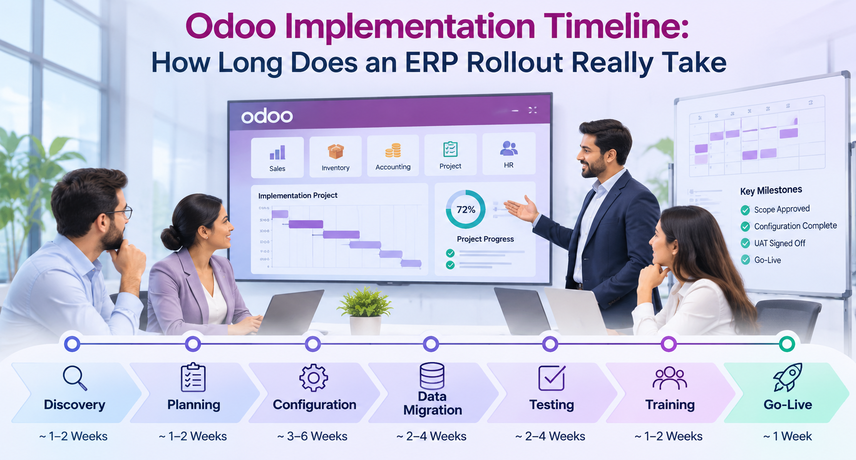
An Odoo implementation timeline can range from a few weeks to several months depending on business size, project scope, integrations, and customization. According to Vraja Technologies’ implementation guidance, a basic ERP implementation typically takes 2 to 6 weeks, while an advanced ERP implementation may take 2 to 4 months.
The exact schedule depends on the number of apps, data quality, custom work, integrations, testing, training, and how quickly your team can make decisions. This guide explains the Odoo implementation process in plain language, shows realistic Odoo implementation phases, and helps you estimate how long your Odoo ERP implementation may take before you commit to a go-live date.
How Long Does Odoo Implementation Take?
The Odoo implementation timeline should be based on project complexity rather than company size alone. A smaller company with multiple warehouses, EDI, eCommerce, shipping integrations, and custom workflows may require more implementation time than a larger company using only a few standard Odoo modules.
Typical Odoo implementation timeline by complexity
| Project type | Typical scope | Practical planning range |
|---|---|---|
| Basic ERP implementation | Standard modules, limited customization, prepared data, fewer integrations | 2–6 weeks |
| Advanced ERP implementation | Multiple modules, custom workflows, data migration, integrations, broader testing and training | 2–4 months |
These are planning ranges, not fixed delivery promises. The exact Odoo implementation timeline should be confirmed after discovery identifies the required modules, data migration, customizations, integrations, testing needs, training requirements, and go-live constraints.
What Is the Odoo Implementation Process?
The Odoo implementation process is the full sequence of work required to turn Odoo from standard software into a working ERP for your business. It starts before configuration and continues through go-live, stabilization, and support.
In practical terms, the Odoo implementation process includes process discovery, gap analysis, solution design, configuration, data preparation, custom work where needed, integration, user acceptance testing, training, cutover, and post-launch support. Odoo’s own implementation methodology also treats analysis, implementation cycles, validation, training, and go-live as distinct parts of the project.
For buyers, this matters because an ERP implementation timeline should not count only the weeks spent configuring screens. Data cleanup, business decisions, testing, and approvals often take as much calendar time as the technical work.
Odoo Implementation Process: From Discovery to Go-Live
Most Odoo implementation phases follow the same logic even when partners use different names. The work moves from understanding the business to configuring the system, proving it works, preparing the team, and then moving into production.
Phase 1: How Long Should Discovery and Scoping Take?
Discovery may take several days to a few weeks depending on project complexity. The purpose is to understand current workflows, identify gaps, define the first release, document integrations, and remove uncertainty before configuration begins.
This is the point where the Odoo implementation process should answer basic questions: Which apps are going live? Which business units are included? What data must move? Which integrations are required? Which reports are mandatory on day one? Who approves decisions?
A short discovery is not always better. If the scope is unclear, the Odoo implementation timeline may look faster on paper but usually expands later through rework and change requests. A useful discovery ends with a written scope, assumptions, exclusions, owners, milestones, and a target go-live window.
Phase 2: How Long Does Configuration and Development Take?
Configuration and development are often among the longer parts of an Odoo implementation. The duration depends on the number of modules, workflow complexity, permissions, approval rules, reporting needs, integrations, and the amount of approved custom development.
The Odoo ERP implementation moves faster when teams use standard Odoo features wherever possible. Custom fields or reports may add limited effort, while custom modules, complex pricing logic, industry-specific approvals, or deep accounting changes add development and retesting time.
Before adding custom work, compare the requirement with standard Odoo. Vraja Technologies’ guide to custom Odoo development explains when standard functionality is not enough and when a custom module is justified.
Phase 3: How Long Does Data Migration Take?
Data migration often runs in parallel with configuration and can take longer when source data is incomplete, duplicated, inconsistent, or poorly structured. The duration depends on data quality, mapping requirements, validation effort, and how much historical information needs to move into Odoo.
During the Odoo implementation process, migration should include data extraction, cleanup, field mapping, test imports, reconciliation, business review, and a final cutover load. Customer records, products, vendors, open transactions, inventory balances, opening accounting balances, and selected history may all need different validation rules.
Poor data is one of the easiest ways to extend an Odoo implementation timeline. Duplicate customers, mismatched SKUs, missing tax information, inconsistent units of measure, or unreconciled balances create work that configuration cannot solve. Start data cleanup during discovery rather than waiting for UAT.
Phase 4: How Long Do Integrations Add to the Timeline?
Integrations can significantly affect the ERP implementation timeline because every external system requires access, mapping, testing, error handling, and validation. Projects involving eCommerce, shipping, EDI, payments, tax systems, marketplaces, or other software should include integration work in the schedule from the beginning.
Common U.S. Odoo ERP implementation integrations include Shopify or WooCommerce, UPS, FedEx, USPS, EDI networks, payment gateways, tax engines, marketplaces, CRM tools, and legacy accounting systems. EDI and carrier workflows often require partner-specific testing, so their dates should be included in the project plan from the start.
Do not assume integration testing can be left until the final week. The Odoo implementation timeline should include time to receive credentials, test sandbox environments, resolve API limitations, verify data direction, and repeat failed scenarios.
Phase 5: How Much Time Should UAT Take?
User acceptance testing should allow enough time for real business scenarios, issue fixing, and at least one retest cycle. The exact duration depends on the number of workflows, departments, integrations, and issues identified during testing.
Testing should follow real scenarios, not demo clicks. Sales should test lead-to-order. Purchasing should test purchase-to-receipt-to-bill. Finance should validate taxes, payments, aging, and period-end reports. Warehouse teams should test receiving, transfers, picking, packing, and shipping. Manufacturing teams should test material demand, work orders, and finished goods.
The Odoo implementation phases should not mark UAT complete just because screens load correctly. The goal is business sign-off. If users find errors in the first round, the Odoo implementation timeline must leave enough room to fix and retest them.
Phase 6: How Long Do Training and Go-Live Take?
Training, cutover, and post-launch support should be planned around the number of teams, user roles, locations, and business processes changing at go-live. Advanced implementations normally require more preparation, validation, and post-launch support than a basic rollout.
A good Odoo ERP implementation uses role-based training. Finance, warehouse, sales, purchasing, and administrators do not need the same session. Key team members should practice in the tested system before the final cutover so they recognize the workflows they will use on day one.
The final Odoo implementation timeline should also include a cutover checklist: final data freeze, last migration, integration checks, user access, smoke tests, backup confirmation, go/no-go approval, and a rollback decision point.
What Factors Change the Odoo Implementation Timeline the Most?
The biggest timeline drivers are scope, customization, data readiness, integration complexity, internal availability, and decision speed. These factors matter more than user count by itself.
- Number of apps and business processes: every added workflow requires configuration and testing.
- Data quality: dirty or poorly structured data adds cleanup and reconciliation work.
- Customization: custom modules require design, development, QA, documentation, and upgrade planning.
- Integrations: every external system adds technical dependencies and test cycles.
- Multiple companies or warehouses: shared rules, inter-company flows, permissions, and reporting add complexity.
- Internal capacity: the partner cannot decide approval limits, tax rules, or business policy without your team.
- Approval speed: delayed sign-offs can pause the Odoo implementation process even when development is finished.
- Compliance and seasonality: audits, tax deadlines, peak sales periods, or industry rules can limit cutover dates.
When estimating how long does Odoo implementation take, these variables should be documented before a date is promised. A realistic Odoo implementation timeline shows dependencies as well as tasks.
How Should You Build a Realistic ERP Implementation Timeline?
Build the schedule backward from business constraints, then add time for scope, data, testing, and decisions. A realistic ERP implementation timeline is a working plan with owners and dependencies, not just a target go-live date.
- List the business processes that must work on day one and move optional items to a later phase.
- Document every system that must exchange data with Odoo, including who owns access and testing.
- Start data cleanup before configuration is complete.
- Assign a business owner for each process and define how quickly decisions must be made.
- Schedule at least two meaningful UAT cycles for important workflows.
- Avoid go-live near year-end, quarter-end, inventory counts, peak sales, audits, or major operational events.
- Include hypercare and the first month-end close in the ERP implementation timeline rather than treating them as separate support work.
If you want a scoped project plan before committing to dates, review Vraja Technologies’ Odoo implementation services for discovery, configuration, migration, integration, testing, training, and go-live planning.
How Can You Shorten the Odoo Implementation Timeline Without Increasing Risk?
The safest way to shorten the Odoo implementation timeline is to reduce uncertainty, not to remove testing. Standardize scope, clean data early, use standard features first, and make business decisions quickly.
- Prioritize must-have workflows for the first release.
- Use standard Odoo functionality unless customization solves a clear business gap.
- Prepare product, customer, vendor, accounting, and inventory data before migration workshops begin.
- Name one decision-maker who can resolve cross-department conflicts.
- Provide integration credentials and third-party contacts early.
- Test using real business scenarios and fix issues before cutover.
- Train department leads during UAT so training does not start from zero at the end.
Trying to compress the Odoo implementation phases by skipping discovery or UAT usually moves the work rather than removing it. The problems then appear during go-live, when they are harder and more disruptive to fix.
How Does Custom Development Affect the Timeline?
Custom development extends the Odoo implementation timeline because every custom feature needs analysis, development, testing, documentation, and future upgrade consideration. The impact can be small for a report and significant for a custom operational module.
During an Odoo ERP implementation, classify custom requests into three groups: required for go-live, useful but deferrable, and unnecessary because standard Odoo already covers the need. This keeps the first release focused and protects the ERP implementation timeline from uncontrolled scope growth.
A useful rule is to prove the standard workflow before approving custom code. If the requirement remains valid after configuration and testing, then add it with a visible estimate and a change to the Odoo implementation timeline.
How Do Cost and Timeline Affect Each Other?
Timeline and cost are closely connected because extra weeks usually mean additional consulting, development, testing, and internal staff time. A delayed decision can increase cost even when no new feature is added.
Vraja Technologies’ Odoo implementation cost guide explains the main budget drivers, including customization, integrations, data migration, training, and hosting. Use the cost model together with the Odoo implementation timeline so the project plan reflects both money and time.
A shorter schedule is not automatically cheaper. If teams compress the Odoo implementation process and create rework, emergency fixes, or a second data migration, total cost can rise. The better goal is a controlled schedule with clear scope and predictable decisions.
Why Work With Vraja Technologies on Your Odoo Rollout?
Vraja Technologies helps U.S. businesses plan Odoo around real workflows, data, integrations, and business constraints rather than using a generic calendar. The team works across implementation, customization, migration, EDI, shipping, eCommerce, marketplace, and third-party integrations.
For a new Odoo ERP implementation, the first goal is to define what must be live, what can wait, what data is ready, and which systems must connect. That gives the project a defensible Odoo implementation timeline and reduces surprises during testing and cutover.
Vraja Technologies can also help review an existing ERP implementation timeline, identify missing dependencies, and separate standard Odoo configuration from custom development before the build begins.
Next Step: Build a Timeline You Can Actually Use
A reliable Odoo implementation timeline starts with a clear scope, clean data, named owners, realistic testing, and enough time for decisions. The fastest project is not the one with the shortest proposal; it is the one that removes uncertainty before go-live.
Use the Odoo implementation process in this guide as a planning framework, then adjust the Odoo implementation phases for your modules, integrations, data, and business calendar. If you are still asking how long does Odoo implementation take for your company, the next step is a scoped discovery rather than a generic estimate.
Vraja Technologies can review your requirements, define the first release, and build an ERP implementation timeline around your actual business constraints. A well-planned Odoo ERP implementation gives your team a clear path from discovery to a stable production system.
Frequently Asked Questions About the Odoo Implementation Timeline
How long does Odoo implementation take for a small business?
For a basic implementation with standard workflows and limited complexity, Vraja Technologies provides a planning range of approximately 2 to 6 weeks. Customization, integrations, data preparation, and broader testing requirements can extend the Odoo implementation timeline.
How long does a mid-sized Odoo ERP implementation take?
A mid-sized implementation may fall into Vraja Technologies’ advanced ERP implementation range of approximately 2 to 4 months when it includes several modules, data migration, integrations, testing, customization, and training. The timeline can increase when data is not ready or business approvals are delayed.
What are the main Odoo implementation phases?
The main Odoo implementation phases are discovery, solution design, configuration, data migration, integration, UAT, training, cutover, and hypercare. Some phases overlap, especially migration and integration work during configuration.
What is the longest part of the Odoo implementation process?
The longest part of the Odoo implementation process varies by project. Configuration may take the most calendar weeks, while data cleanup, migration, and integration testing are often the activities that create unexpected delays.
Can Odoo be implemented in less than one month?
Yes. Vraja Technologies lists 2 to 6 weeks as the planning range for a basic ERP implementation, so a tightly scoped project may be completed within one month. This generally requires standard workflows, prepared data, limited customization, and few integration dependencies.
Does customization always make Odoo implementation slower?
Customization usually adds time because it requires design, development, testing, and retesting. During an Odoo ERP implementation, standard features should be tested first so custom work is reserved for requirements that genuinely affect the business.
How much buffer should an ERP implementation timeline include?
A practical ERP implementation timeline should include contingency for data issues, integration dependencies, retesting, and business approvals. The right buffer depends on complexity; it should be visible in the plan rather than hidden in individual tasks.
Can a phased rollout reduce implementation risk?
Yes. A phased rollout can put core processes live first and move complex apps or integrations to later waves. The complete Odoo implementation timeline may be longer, but the first go-live can happen sooner with less operational change at once.
When should data migration start?
Data preparation should start during discovery. Waiting until configuration is finished usually creates pressure later in the Odoo implementation process. Early cleanup gives teams time to fix duplicates, missing fields, and accounting or inventory differences before UAT.
What should we prepare before asking for a timeline estimate?
Prepare your app list, number of companies and warehouses, data sources, required integrations, custom workflows, reporting needs, approximate user count, and desired go-live constraints. These inputs make the Odoo implementation timeline much more accurate.