Odoo EDI Integration: How ERP and Trading Partners Exchange Data
Odoo EDI integration connects Odoo ERP to your trading partners so purchase orders, acknowledgments, ship notices, and invoices move between systems as structured data instead of email, PDFs, or spreadsheets.
Odoo manages the business records: sales orders, inventory, deliveries, and invoices. An EDI layer translates those records into standardized messages such as ANSI X12 or UN/EDIFACT, sends them over secure channels like AS2 or SFTP, and turns partner replies back into Odoo transactions. This guide explains how Odoo EDI integration works, which Odoo EDI connector options exist, when to buy EDI integration services instead of building in house, and how to deliver ERP EDI integration without failing partner compliance checks.
What Is Odoo EDI Integration?
Odoo EDI integration is a connection between Odoo and an EDI translation and transport layer that automates document exchange with external trading partners.
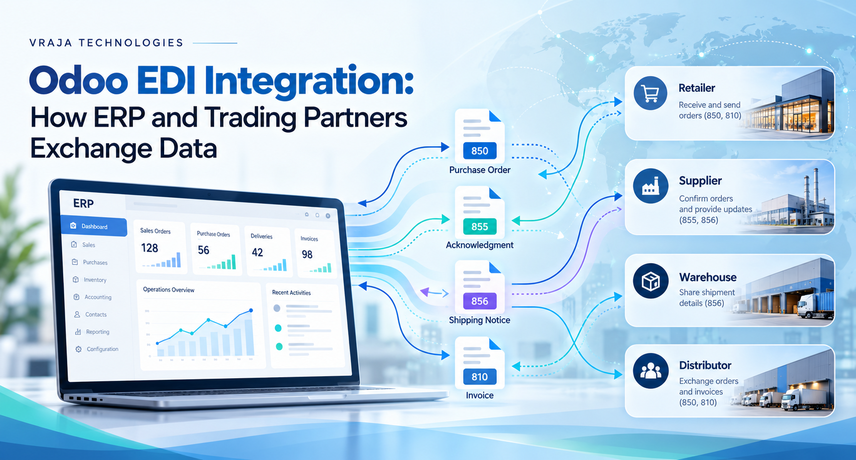
EDI, or electronic data interchange, is the computer-to-computer exchange of standardized business documents. US retailers, distributors, and carriers mostly use ANSI X12 transaction sets maintained by the ASC X12 standards body. International partners often use UN/EDIFACT, maintained under UN/CEFACT. Each document has a numeric code: 850 is a purchase order, 855 a purchase order acknowledgment, 856 an advance ship notice (ASN), 810 an invoice, and 997 a functional acknowledgment. A complete ERP EDI integration maps every code to an Odoo object, so an inbound 850 becomes a sales order without retyping.
Every Odoo EDI integration has three components:
- Odoo data and APIs: sales orders, purchase orders, delivery orders, invoices, products, and partner records.
- Translation and mapping: conversion between Odoo fields and X12 or EDIFACT segments, following each partner’s specification.
- Transport: AS2, SFTP, a value-added network (VAN), or an EDI platform’s API.
Why Do Trading Partners Require EDI?
Trading partners require EDI because standardized electronic documents remove manual entry, speed fulfillment, and let them enforce compliance at scale.
A retailer receiving thousands of orders cannot key in each supplier’s email or spreadsheet. Retailers, third-party logistics providers and marketplaces increasingly require EDI for purchase orders and invoices, and that suppliers without it fall back on manual work that slows fulfillment and adds compliance risk. For a growing Odoo company, Odoo EDI integration often decides whether it can win or keep a large account, and ERP EDI integration is how it meets that demand without adding data-entry staff.
Does Odoo Have Built-In EDI?
No. Odoo includes electronic invoicing but not native X12 or EDIFACT order exchange with trading partners.
Odoo sends and receives e-invoices in formats such as Factur-X and XRechnung and can act as a Peppol(the network used to exchange electronic documents) access point, but it does not cover retailer orders over AS2 or OFTP(methods used to transport documents). Orderful reaches the same conclusion for US users: Odoo supports EDI through community modules and custom builds, not a full-service solution out of the box. That gap is why every Odoo EDI integration needs a connector module, an EDI platform, or custom development, and why ERP EDI integration is a separate project from Odoo setup.
How Does ERP EDI Integration Move Data Between Odoo and a Trading Partner?
Data moves in a loop: the partner sends a document, the EDI layer validates and translates it, Odoo creates a record, and Odoo’s response returns as a new EDI document.
The exact loop depends on whether you sell to retailers (supplier side) or order from vendors (buyer side). Both use the same building blocks.
Order-to-Cash ERP EDI Integration: From Retailer 850 to Odoo Invoice
- The retailer sends an X12 850 over AS2 or SFTP.
- The EDI layer validates syntax and returns a 997.
- The Odoo EDI connector matches the partner, ship-to location, and item numbers, then creates a sales order.
- Odoo confirms the order and sends an 855 if the partner requires one.
- The warehouse picks and packs. Validating the delivery generates an 856 with carton or pallet label data.
- Posting the customer invoice generates an 810.
Procure-to-Pay ERP EDI Integration: From Odoo 850 to Vendor Bill
Buying runs in reverse. Odoo sends an 850 from a confirmed purchase order, receives 855 and 856 documents from the supplier, and imports the 810 as a vendor bill for matching against the receipt. A third-party Odoo EDI connector, the AS2 and FTP X12 module on the Odoo Apps store, follows this pattern: it exports 850 and 860 documents and imports 855, 856, 810, 832, and 997 documents.
Acknowledgments and Exception Handling
A 997 confirms that a document arrived and passed syntax checks; it does not confirm the business content was accepted. Treat every rejection as a work item. A missing product code should raise a visible error, not a silent failure. much. Consulting describes logging every sent and received document and flagging errors, such as a product that does not yet exist in Odoo, as core Odoo EDI connector behavior.
EDI Document Types in Odoo: 850, 855, 856, 810, and 997
| Code | Document | Typical Odoo object | Typical direction |
|---|---|---|---|
| 850 | Purchase order | Sales order (supplier) or purchase order (buyer) | Inbound or outbound |
| 855 | PO acknowledgment | Order confirmation | Outbound or inbound |
| 856 | Advance ship notice | Validated delivery order | Outbound or inbound |
| 810 | Invoice | Customer invoice or vendor bill | Outbound or inbound |
| 997 | Functional acknowledgment | EDI message log status | Both |
| 860 | PO change | Sales or purchase order update | Inbound or outbound |
| 832 | Price and sales catalog | Pricelist | Either |
| 846 | Inventory advice | Stock levels | Outbound |
| 940 / 945 | Warehouse shipping order / advice | Delivery order handled by a 3PL | Outbound / inbound |
Odoo EDI Connector Options: Native Module, API Platform, VAN, or Custom Build
| Approach | How it works | Strengths | Watch-outs |
|---|---|---|---|
| Native Odoo EDI connector module | A Python module inside Odoo builds and parses X12 or EDIFACT and moves files by AS2 or SFTP | Data stays in Odoo; mapping control; fees can be one-time | Needs Odoo.sh or on-premise hosting; you own upgrades and partner testing |
| API-based EDI platform | Odoo calls the platform’s API; the platform translates and reaches partners | Fast partner onboarding; shared partner network | Recurring subscription and connection fees; depends on Odoo API stability |
| Managed EDI integration services or VAN | A provider maps, routes, and monitors documents for you | Least internal effort | Ongoing service fees; slower change requests |
| Custom build | Your developers write the parser, mappings, and transport | Full control | Highest maintenance; needs deep EDI skill |
How Do You Choose the Right Odoo EDI Connector?
- Partner count and volume: much. Consulting describes its Odoo EDI connector as a fit for companies with 30 or more customers or suppliers, 1000 or more orders a month, or large retailers that require EDI. Smaller footprints may not need network-scale EDI integration services.
- Hosting: Odoo Online does not allow third-party Python modules, so a module-based Odoo EDI connector needs Odoo.sh or on-premise hosting. API-based platforms need external API access, which Odoo’s documentation limits to Custom plans on Odoo Online.
- Protocols: confirm that AS2 with signed receipts, SFTP, or VAN support matches what each partner requires.
- Retailer rules: check ASN timing, label standards such as GS1-128 pallet labels, and item identifiers such as GTINs.
- API upgrade path: Odoo’s documentation marks XML-RPC and JSON-RPC as deprecated since Odoo 19, with the common and object services scheduled for removal in Odoo 22 (fall 2028) and on Odoo Online 21.1 (winter 2027). Ask whether the vendor builds on the newer JSON-2 API.
- Ownership: ask whether a provider’s EDI integration services include fixing a rejected 856 at 6 p.m. Our comparison of an Odoo development company vs. an in-house team covers that trade-off, and our guide to when to hire an Odoo developer for custom module development explains when partner-specific mappings justify custom code.
How Do You Implement Odoo EDI Integration Step by Step?
Implement Odoo EDI integration in eight steps: inventory partners, clean master data, choose transport, configure the connector, map documents, test with each partner, pilot, then go live and monitor.
Partner testing, not Odoo configuration, usually sets the Odoo EDI integration schedule, whether you hire EDI integration services or build in house. much. Consulting reports that partner responsiveness is typically the blocker, so start partner outreach first.
Step 1: Inventory Trading Partners and Requirements
List each partner, document type, X12 version, and transport method. Request the partner’s EDI implementation guide and routing guide before any Odoo EDI integration work begins.
Step 2: Clean and Cross-Reference Master Data
Match Odoo products to partner item numbers, GTINs, and units of measure. Map partner ship-to codes to Odoo delivery addresses. Unmatched product codes stop order imports, so fix them before testing.
Step 3: Choose Transport and Exchange Credentials
AS2, defined in RFC 4130, provides signed and encrypted transfer with delivery receipts. SFTP is simpler but offers fewer built-in receipts. Exchange sender IDs, qualifiers, certificates, and endpoints with each partner.
Step 4: Configure the Connector and Partner Profiles
Set defaults for incoming orders, such as salesperson, warehouse, and shipping method, then set the polling interval. The much. Consulting connector checks for new orders every ten minutes by default and can poll as often as every five.
Step 5: Map Documents and Business Rules
Map each field from the partner specification to Odoo, because ERP EDI integration mapping drives every later result, then define rules for price variances, partial shipments, cancel dates, and duplicate purchase order numbers.
Step 6: Test Every Document Cycle With Each Partner
Run the full 850, 855, 856, and 810 cycle in test mode. Add negative tests: an unknown item, a duplicate order, and an invalid ship-to. Get written partner sign-off.
Step 7: Pilot, Then Run in Parallel
Go live with one partner or one ship-to group first. Compare EDI output against the manual process for several order cycles.
Step 8: Go Live and Monitor
Track failed documents, unacknowledged documents, and late ASNs on a dashboard. Add regression tests that run after every Odoo upgrade, and ask providers whether their EDI integration services include that monitoring.
What Mistakes Break an ERP EDI Integration?
Most Odoo EDI integration failures come from data mismatches, ignored acknowledgments, and untested upgrades, not from the EDI standard itself.
- Unmapped identifiers: item numbers, ship-to codes, and units of measure that do not match Odoo records.
- Duplicate processing: a retried 850 imported twice. Enforce unique partner purchase order numbers.
- ASN and label mismatch: the 856 must match what physically ships. Retailers commonly scan labels built to GS1 US standards at receiving.
- Ignored 997s and rejections: unacknowledged documents age silently until a partner complains.
- Skipped regression tests: Odoo upgrades and API changes can break mappings that worked for years.
Odoo EDI Security: Certificates, Credentials, and Audit Trails
Secure the connection with signed and encrypted transport, restricted credentials, and a complete audit trail of every document.
Use AS2 certificates or SFTP keys per partner, rotate them on a schedule, and store them outside Odoo’s general user permissions. Limit who can edit mappings, and log every sent and received message so disputes can be resolved from evidence. Review these controls whenever you add a partner to your Odoo EDI integration.
Why Work With Vraja Technologies for Odoo EDI Integration?
Vraja Technologies is a certified Odoo partner that delivers EDI integration services natively inside Odoo using FTP, SFTP, and AS2, with no monthly subscription for the integration.
The company reports more than 8 years of experience, 400+ Odoo applications, and clients in 45+ countries, including the United States. Its Odoo EDI integration work and other EDI integration services sit alongside shipping, eCommerce, and accounting integrations, and delivery follows Git-based development, customer approval in staging, and rollback planning. Vraja Technologies supports businesses across the United States, Canada, the United Kingdom, Europe, Australia, and New Zealand from its Rajkot, India, office.
ERP EDI integration rarely stands alone. If your Odoo rollout is still ahead of you, pair EDI with ERP implementation services so item masters, warehouses, and partner records are designed for EDI from day one. If Odoo already runs your operations, Vraja Technologies can scope the connector, partner testing, and support separately.
What Is the Next Step for Your Odoo EDI Project?
Start by listing your trading partners, their document requirements, and your Odoo hosting model. Those three inputs determine whether your Odoo EDI integration uses a native Odoo EDI connector, a platform, or a custom build. Then request EDI integration services scoping from Vraja Technologies covering partners, documents, testing, and support.
Odoo EDI Integration FAQs
Does Odoo support EDI natively?
Only for e-invoicing. Odoo supports formats such as Factur-X and XRechnung and can act as a Peppol access point, but retailer order exchange over X12 or EDIFACT needs a connector, platform, or custom build.
What is the best Odoo EDI connector?
No single connector fits every company. The best one matches your hosting, partner count, required protocols, and upgrade path. Compare at least one native module and one API-based platform against your partner list, and ask each provider of EDI integration services for references, before deciding.
What EDI documents can Odoo exchange?
Odoo can exchange 850 purchase orders, 855 acknowledgments, 856 ship notices, 810 invoices, and 997 acknowledgments, plus 860, 832, 846, 940, and 945 documents when the Odoo EDI connector supports them. Coverage depends on the connector and the partner’s specification.
How long does Odoo EDI integration take?
Timelines depend mainly on partner testing, not Odoo configuration. Providers of EDI integration services scope a standalone connector after you list partners and documents. Vraja Technologies’ implementation guidance puts complex Odoo projects that include EDI at three to six months or longer, and EDI is often one part of a broader ERP rollout. Treat all estimates as provisional until scoping ends.
Does Odoo Online support EDI?
Only with limits. Odoo Online does not allow third-party Python modules, and external API access is restricted to Custom plans, so many companies move to Odoo.sh or on-premise hosting before starting Odoo EDI integration.
Is EDI the same as an API?
No. EDI is a set of standardized document formats and exchange rules shared across industries, while an API is an interface a system exposes. In ERP EDI integration, an API-based platform uses an API to carry EDI data between Odoo and the partner network.
Do I need a VAN for Odoo EDI integration?
Not always. Many partners accept direct AS2 or SFTP connections, and API-based platforms replace VAN routing. A VAN or managed EDI integration services help when many partners require it or you want one managed mailbox.
Can Odoo EDI integration meet large retailer requirements?
Not always. Many partners accept direct AS2 or SFTP connections, and API-based platforms replace VAN routing. A VAN or managed EDI integration services help when many partners require it or you want one managed mailbox.